Your business deserves the best text expander.
typedesk is the leading text expander for Windows and Mac, combining advanced features, native AI integration, and the easiest apps to save you and your team 30 hours per month!

Rated 4.8/5 over 300+ verified reviews
Available on Mac, Windows and in your browser
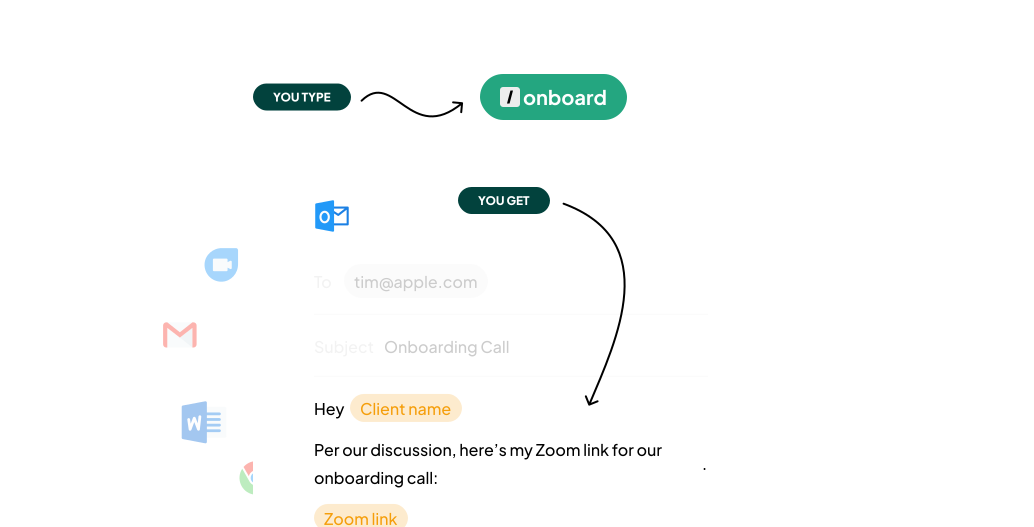
Your shortcut to productivity
typedesk is a text expander software designed from the ground up with speed and ease in mind. Our lightning-fast native apps (including a mac text expander and the best text expander windows) offer the seamless and powerful text expansion you’ve always wanted!
See all featuresThe text expander that works everywhere you do
Looking for a text expander for chrome? typedesk text expander app works inside and outside your browser: our text expander for Windows and Mac makes your shortcuts available in 10,000+ apps and websites! Looking for a mac text expander? You're in the right place.


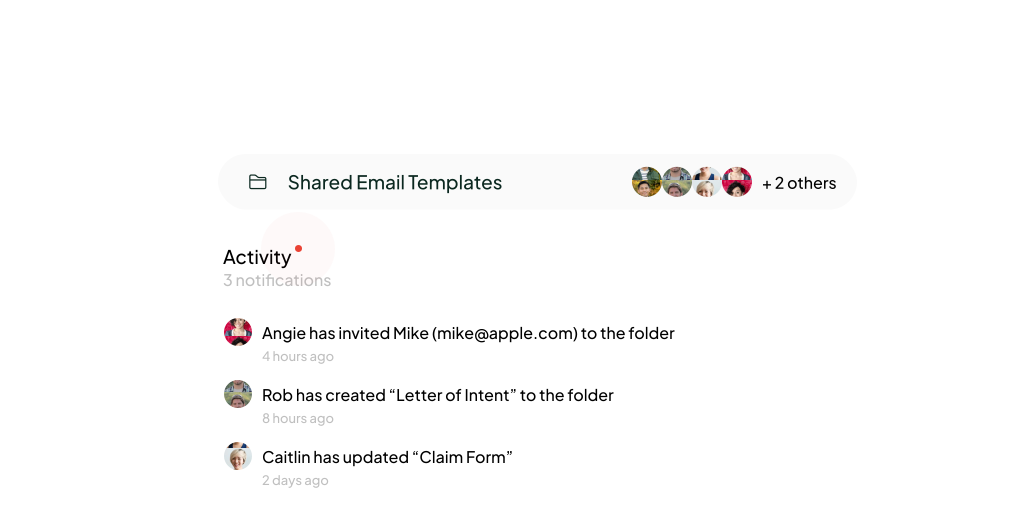
Reclaim time at scale
Save your co-workers 7 hours per week. With shared folders and individual user permissions, typedesk empowers seamless collaboration across departments and teams, ensuring the right message is being sent out every time, whether they need a text expander for Windows or a mac text expander.
Learn more about teamsThe best text expander loved by 15,000+ companies




Use AI superpowers, everywhere!
typedesk is the world-first text expander that also acts as an ai prompts generator. Create powerful prompt templates, share them across departments, and generate text using AI with a simple shortcut, everywhere you work, thanks to typedesk ai text expander.
Learn more
Save time with on all your current apps & websites
typedesk slots into your existing apps and websites effortlessly. With our versatile mac text expander, you can streamline communication and save valuable time, whether you're replying to emails, managing support tickets, or engaging on social media. No more app switching—just efficient, unified messaging at your fingertips.
Learn more
Privacy-by-design
Worried about privacy? typedesk text expander for Windows and Mac never collects your keystrokes or use your data. We encrypt your templates using AES-256 in CTR mode with HMAC-SHA256 for integrity protection. Our providers are SOC type 2 and 3 compliant.
Read our security policy
Keyboard-first approach
Navigate your typing tasks with lightning speed using typedesk's keyboard-first approach. Craft and deploy responses faster than ever, with intuitive shortcuts that put your productivity on the fast track. It's a typing revolution that IT and power users adore.
See all the shortcuts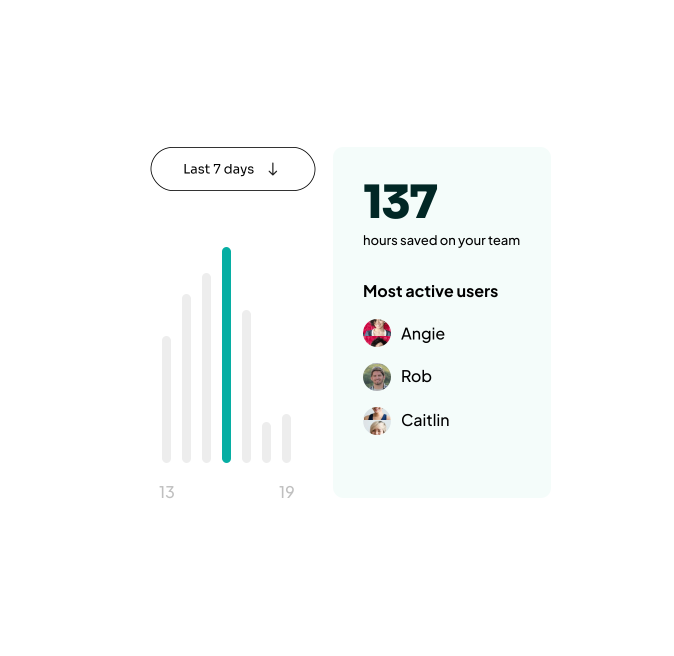
Stay on top of your productivity with Activity reports
Embrace clarity with typedesk's Activity reports. Dive into data that matters—track your team's typing trends, and optimize workflows. All with the security and ease you expect. It's not just about working; it's about working smarter.
Learn more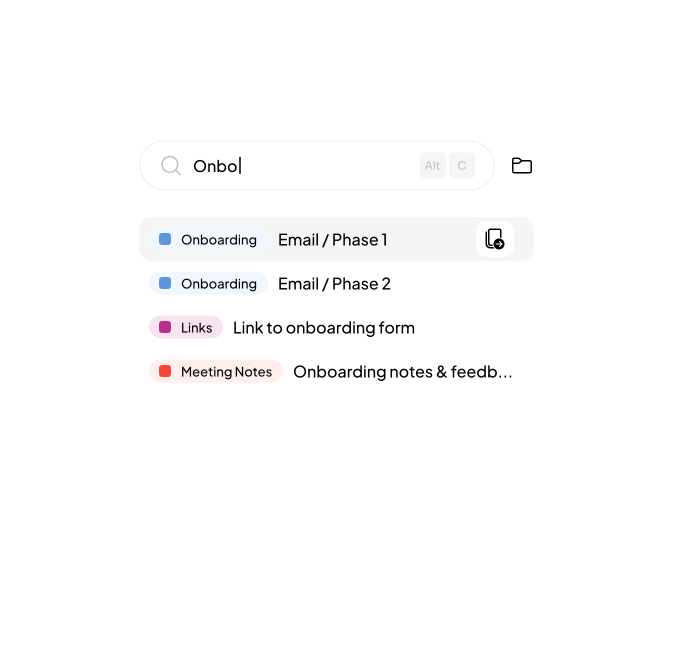
Quickly find any snippet with the Quick Expander
Navigate your snippet library at lightning speed using typedesk's Quick Expander. Instantly locate the perfect canned response with a few keystrokes, streamline your communication, and enhance your workflow efficiency without ever leaving your workspace.
Learn more
Advanced Variables for Tailored Interactions
Create personalized communication effortlessly with typedesk's Advanced Variables. Dive into a world of dynamic content that adjusts to your audience, ensuring every message is both relevant and resonant. Need a free document template creator? Create long-form documents that you can easily personalize thanks to typedesk's variables.
Learn moreReady to save 30 hours per month?
Join the text expander revolution. Get typedesk text expander tool for you and your team today to reclaim your time!

It is love at first type
Our top teams save $900 per month by using typedesk text expander!
Read all reviews
I love typedesk! It is by far one of my favourite tools to have in our tech stack.

Pip Meecham
Tech Advisor & ClickUp Channel Partner
We use typedesk to ensure that communications remain aligned and uniform across all our channels as our company scales up.

Michael Johnson
Senior Certification Specialist, HighLevel
This software is unreal. It's like having a ChatGPT writing assistant on every single app I use and having all the prompts I can create at my fingertips.

Michael Montefusco
Founder, Fitness Marketing Machine
This app is a phenomenal tool.

David Shutler
Senior Recruitment Consultant
While our help desk does provide saved answers, I use typedesk to maintain a personal voice in my canned responses quickly and efficiently.
Melanie Shears
Finance & People Operations, Customer Billing Specialist, Helpscout
Typedesk is one of my favourite tools and saves me literally 2+ hours a day, I use it every 5 mins or so. Highly recommended!

Shane Harris (Patch)
@shane_harris_patch_
Very interesting.. love the functionality

Bernard T
Serial entrepreneur, tech geek
There's no app that can do what this does.

Rita Schaff
I love testing applications
I had a couple of other tools that provided some similar functions to typedesk, but once I started to learn the additional capabilities, I dumped the others and settle on typedesk. I’ve still far from master everything that could be possible, simply down to the availability of my time, but I use it daily, I’ve been able to separate home and business uses into a clearly define set, and can call them from a single interface. Being able to return different data, in multiple ways depending on circumstance is brilliant, it simply prompts me to give it the right scenario, and it reformats to suit. I had a small issue with the Mac version on initial install, but support were responsive, helpful and resolve the issue in the next release, and gave me a temporary work around. Bugs are fine if support is there, so that was a positive experience too. I’m very happy with typedesk and look forward to expanding my use of it, and continue to share knowledge about it with friends and colleagues so they benefit too.

Mike Foston
Hi
Really useful. easy to use everyday

Greg Petithomme
@greg_petithomme
The classic investment: text once + save time over and over again.

Urs Frei
@urs_frei

Cyndi Dermody
@cyndi_dermody
It is very easy to use. Simplicity is key which is perfect, because you don't want to be bogged down and distracted when a fast response is required. Glad i purchased, will definately get my ROI with time saved
James_Riddles
I didn't think it was very useful for my small business but I tried it and within a day I purchased a code! It is so awesome and helpful. Saves me loads of time and I no longer make the mistake of putting someone else’s name in an email when copying the text. I use it to put in my brand color codes everywhere when needed, fast reply's and so much more. Really love it.
Puck
This is an extremely helpful tool. Several times a day I have to input information into a government form. Each requires that I type two identical sentences into each form. Typedesk allows me to speed throught this. Only saves a few seconds per form, but it certainly adds up.
Sumo-ling
I love typedesk! There are so many times when I need to send or reply to a message but I'm in the middle of something else. Typedesk is the perfect tool for those times because it allows me to quickly create, customize and organize set responses. It's also great because I can share and edit my responses with my entire team across multiple platforms.
Sumo-ling
Great product and even better support! Shout out to Michel for his help!
Mr.Johnson
Typedesk is a great way to automate your email responses.
janawilliams
Overall, good tool that does what it says. Useful if you have a lot of texts that you often reuse. Not just for emails but actually for any text or words, or emojis. Tool is simple but functional, you can group your texts into folders etc. It is rather intuitive and works well.
atis
This is exactly what I needed for my team to build better systems!
Nookie_at_Dating_Kinky
Anyone that values their time should use a text expander solution.
Sumo-ling
Typedesk is a great tool for those who want to save time.
Avinash.Katta
I used to use TextBlaze which did a great job. But their team plans start at $6.50/user/month.
rnh
Typedesk is perfect for when you need to get responses out quickly and don't want to have a messy doc open in another window. You can organize all your canned responses easily and retrieve them quickly! Try it out, you'll love it!
Nik_D
Sometimes you need an app that just works, and for me that’s TypeDesk. Everyone knows it’s annoying when you copy and paste something and then you copy something else the first thing is erased and you get caught in copy and paste purgatory. Canned responses are really a great use for Type Desk but I use it for much more. I keep code for websites, APIs, and apps there. I keep dummy text for my designs, hashtags for my social tools, and tons of my brand messaging, taglines, copy, brand voice samples, and so much more. Just recently I added some brand messaging to an AI content writer and then I was able to add the blog outlines and copy I generated in type desk to use in email, website, and social channels. It’s really great.
brice7

Frequently asked questions
Need more info about typedesk text expander? Visit our learning centre to become a template master!
Visit learning center
 What is a text expander?
A text expander for Windows and Mac is a productivity tool that allows users to create shortcuts for frequently typed phrases, sentences, or paragraphs. These shortcuts, known as text snippets, automatically expand into the full text when typed, saving time and effort. The text expander app is particularly useful for businesses and individuals looking to streamline their typing tasks and create consistent text templates for communication.
Is typedesk text expander free?
typedesk offers a versatile text expander solution with a free version that includes basic features, allowing users to experience the power of text snippets and text templates without any initial investment. For advanced features and unlimited usage, there are premium plans available that cater to a variety of needs.
Is your text expander a Chrome extension?
Yes, the typedesk text expander is available as an auto text expander for chrome, making it easily accessible and convenient for users who prefer to work within their browser. This extension integrates seamlessly with various online platforms, allowing for quick and efficient use of text snippets and text templates across numerous applications.
Does this work with Outlook?
Yes, typedesk works beautifully with Outlook email client. Click here to see how to use an email template on Outlook.
Why is my current text expander not working with my apps?
If your current text expander is not working with your apps, it may be due to compatibility issues or limitations in the software. typedesk is designed to work across a wide range of platforms, ensuring that your text snippets and text templates are available wherever you need them. Compatibility and integration are top priorities for our text expander app.
Is your text expander Word-compatible?
typedesk's text expander is compatible with Microsoft Word, enabling you to use your text snippets and text templates within one of the most popular word-processing software. This integration helps to enhance your writing efficiency and ensures consistency in your documents.
Do you offer a text expander for Windows?
Yes, typedesk provides a text expander for Windows that works with all your apps and websites. This ensures that whether you're working on emails, documents, or any other typing-intensive tasks, your text snippets are readily available to streamline your workflow on the Windows platform.
How to use text expander?
Using typedesk text expander for Windows and Mac is easy. Use the Quick Access to easily find any template, or define a text shortcut you can use to recall your text templates.
Can I use typedesk text expander with Gmail?
Absolutely, typedesk works with all email clients. Want to learn how to create gmail templates? See our dedicated article!
Do you offer a text expander for iPhone?
typedesk offers a desktop and laptop-friendly text expander. Although not currently available, the text expander for iPhone is under development. This will allow users to quickly insert text snippets and utilize text templates while on the go, enhancing productivity on their iOS devices.
Is this a mac text expander?
Absolutely! typedesk mac text expander works on all mac computers and is the best text expander for mac. typedesk is a great alternative to the build-in text shortcuts.
Do you offer a text expander for Mac?
For Mac users, typedesk has developed a dedicated mac text expander that integrates seamlessly with the macOS environment. This allows for efficient use of text snippets and text templates, making typing tasks faster and more consistent on Mac computers.
What is the best text expander for Windows?
Sign up for FREE today
Join the text expander revolution. Get typedesk for you and your team today to reclaim your time!
Rated 4.8/5 over 300+ verified reviews

Live from our Blog Omnichannel Support Software: How to Choose the Right Tools