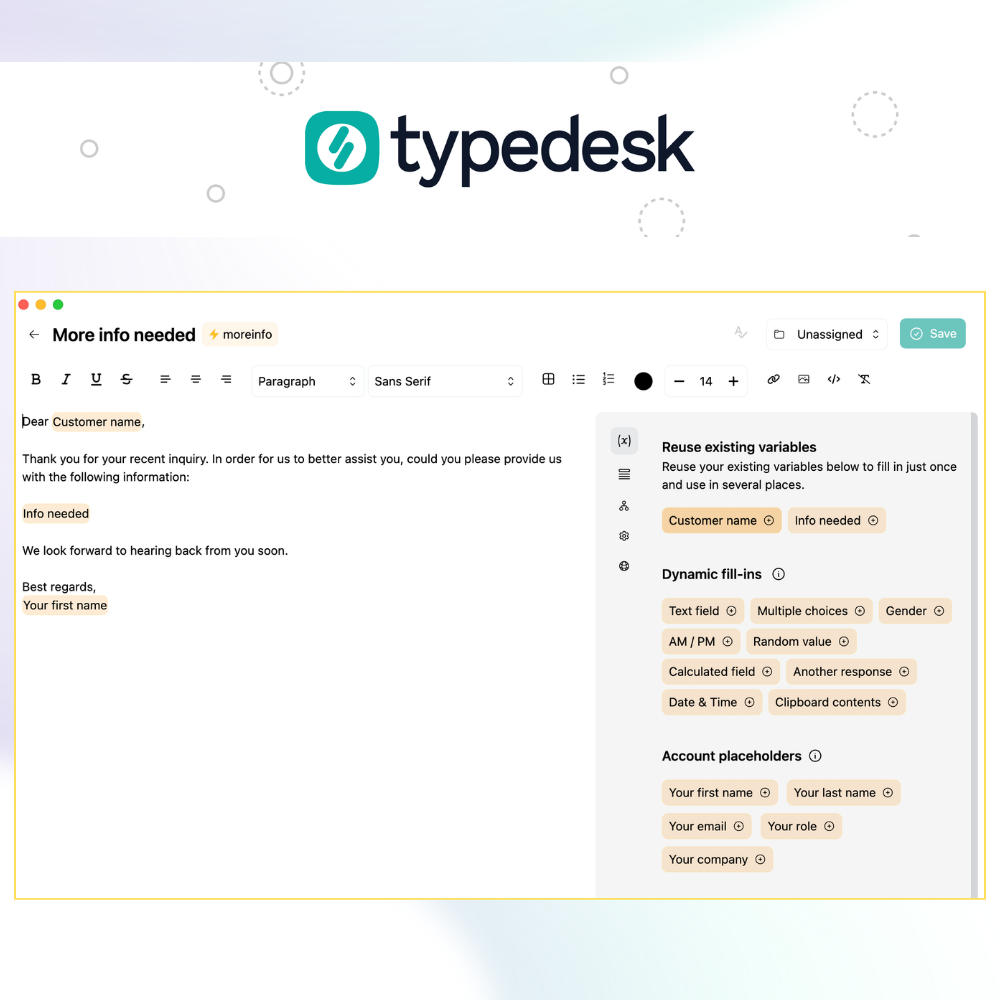
Reply to customers faster and more consistently
Give every support agent instant access to approved, personalized responses inside the help desk, inbox, and chat tools they already use. Manage your team's messaging centrally, update it once, and keep everyone aligned.
Available on Mac, Windows and in your browser

Rated 4.8/5 on Capterra, Product Hunt and G2

Your help desk stores replies. typedesk keeps messaging consistent everywhere.
Saved replies live inside a single help desk. Support happens across many tools — inboxes, live chat, social media, and internal apps. typedesk gives your team one response library that works in all of them, managed centrally.
One shared response library across every inbox, help desk, chat, social channel and internal tool
Controlled personalization through variables, so every reply stays on-brand but never robotic
Update a response once and the whole team keeps working from the same version
Permissions and folders to organize different teams and workflows
 Mélanie Shears, Customer Billing Specialist, Helpscout

Built for the messages support teams send every day
Insert an approved response, personalize the details, and send — without retyping or hunting for the right wording.
Troubleshooting
Insert an approved diagnostic sequence, then personalize the product, the specific issue, and the next step for that customer.
Incident communication
Keep every agent on the same message as status information changes — update the response once and the whole team is aligned instantly.
Refunds & billing
Apply a consistent, policy-approved response to refund and billing requests while agents keep their own personal voice.
Your shortcut to productivity
Pick an example, type the shortcut in the box, and watch your full reply appear — no install needed.
Type in the text box below
Playground
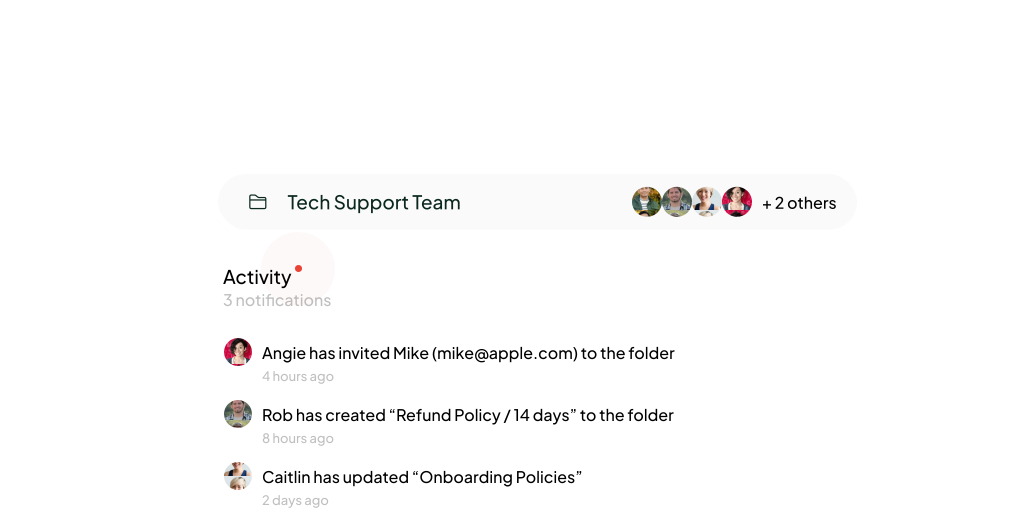
One library that scales with your support team
Organize responses into folders, share them with the right people, and control who can view, edit, or manage each one. When a response changes, everyone keeps working from the same approved version — and the Activity feed notifies the team.
Explore collaboration featuresNot just another canned response app
Works on top of the tools your agents already use
typedesk runs alongside your existing apps and websites without changing your team's habits or workflows. The desktop app works everywhere you type; the browser extension covers your web tools.


Privacy your customers can trust
typedesk doesn't log your keystrokes, and the data your agents type into dynamic fill-ins is never sent to our servers. Traffic is protected with HTTPS/TLS and hosted on providers offering the highest level of security.
Read our security policySee adoption and time saved
On our Enterprise plan, Team Metrics show which responses are used, how your team is adopting the library, and the time it saves — so managers can measure the impact.
Talk to us about EnterpriseReusable AI prompts, shared like any other response
Build AI prompts once and share them with the team, so everyone starts from the same on-brand drafts, then personalizes before sending.
Support and customer success teams rely on typedesk

It was love at first type
Our most productive support teams save up to 30 hours and $900 a month with typedesk text expander.
Read all reviews
I love typedesk! It is by far one of my favourite tools to have in our tech stack.

Pip Meecham
Tech Advisor & ClickUp Channel Partner
We use typedesk to ensure that communications remain aligned and uniform across all our channels as our company scales up.

Michael Johnson
Senior Certification Specialist, HighLevel
This software is unreal. It's like having a ChatGPT writing assistant on every single app I use and having all the prompts I can create at my fingertips.

Michael Montefusco
Founder, Fitness Marketing Machine
This app is a phenomenal tool.

David Shutler
Senior Recruitment Consultant
While our help desk does provide saved answers, I use typedesk to maintain a personal voice in my canned responses quickly and efficiently.
Melanie Shears
Finance & People Operations, Customer Billing Specialist, Helpscout
I(we) absolutely LOVE typedesk. This is a no brainer for any solopreneur or team that have to deal with customers support, fill forms on a regular basis, or just save time in general. It also syncs up on the cloud with everyone on the team so we have brand consistency across the company and remove the guessing out of the replies that our team have to generate keeping it custom for all our clients. We write or edit it once, and the entire team is automatically up to date for their very next communication. It's 10x faster, and works like a charm across all our platforms. UI is friendly with minimal learning curve. And like that wasn't enough, they just brought chatGPT integration at no extra cost allowing us to bring the power or 'reply', 'paraphrase', 'summarize' and much more to all our activities with the press of a keystroke. No need to copy/paste from one app to another or even having to go to chatgpt itself, it brings it right there and then for us. Thank you, definitely makes our life much easier. Our team now use it for their personal tasks as well.
Patrick Charlier
Co-founder
typedesk saves me so much time! Creating a template is easy to do and these shortcuts save so much time. I'm finding new ways every week to continue optimizing my time by fine tuning my templates. The new features provide easy ways to create multiple results from a single template.
Jason E.
COO
Typdesk is a cross-platform tool that is highly valued by its developers and receives frequent updates. Although I sometimes encounter problems with new updates, the responsive team promptly fixes them. Overall, my experience with Typdesk has been excellent.

Natasha
HR Manager interested in upscaling orgs
Amazing time saver! Things that used to take several minutes now take several seconds. It reduces time, fatigue, and prevents errors. Michel is awesome at updating and maintaining the program. Highly recommended!

Ben Delville
Work in IT, prefer outdoors.
Typedesk is one of my favourite tools and saves me literally 2+ hours a day, I use it every 5 mins or so. Highly recommended!

Shane Harris (Patch)
@shane_harris_patch_
Excellent product! Switched over from T*xtExpand*r and TypeDesk is soooooo much better. I highly recommend to anyone considering purchase. Congrats on the launch and keep up the good work!

C J
Cybersecurity consultant and blogger.
This app is a totally time-saver. So amazing when it comes to typing reports and email messages when I want to save time.

Dr. Gwen Smith
Energy healing life coach
Simply the best time saving app, easy to use and implement and very lightweight

Jamie Forster
@jamie_forster
A useful cross-platform tool that gets much love and attention from its developers and regular updates. From time to time, I run into issues with new updates, but these are quickly fixed by their responsive team and my overall my experience with Typdesk has been amazing.

Panther Productions
Founder Freelance FOSS web agency
Exceptional piece of software. I need to write a ton of E-Mails and created some templates for myself, which I just copied. The Problem was that I needed to manually change some elements like names and other information unique to every single mail. Every so often, it's easy to forget to fill out one of the blank spaces within my text template after copying, which is frustrating when you have sent an e-mail with "Hello _____". There may be some more or less complicated workarounds within some writing & Mail Software I use, but nothing has been as easy to use as typedesk. You can paste your precomposed text in typedesk as a new "canned response", replace your "_____ blank_____" with a variable, individualize how you want to be prompted when it's time to fill in the information in the blank fields. From now on, you just type "/" + "your pre-defined shortcut" and there you go. My personal Killerfeature: It lives outside your applications, so it can be used with every single piece of software where you need to enter text. Regardless if it's within a browser, Mail application, Word, Excel etc.

Marifl
@marcus_ifland
I had a couple of other tools that provided some similar functions to typedesk, but once I started to learn the additional capabilities, I dumped the others and settle on typedesk. I’ve still far from master everything that could be possible, simply down to the availability of my time, but I use it daily, I’ve been able to separate home and business uses into a clearly define set, and can call them from a single interface. Being able to return different data, in multiple ways depending on circumstance is brilliant, it simply prompts me to give it the right scenario, and it reformats to suit. I had a small issue with the Mac version on initial install, but support were responsive, helpful and resolve the issue in the next release, and gave me a temporary work around. Bugs are fine if support is there, so that was a positive experience too. I’m very happy with typedesk and look forward to expanding my use of it, and continue to share knowledge about it with friends and colleagues so they benefit too.

Mike Foston
Hi
This is exactly what I needed for my team to build better systems!
Nookie_at_Dating_Kinky
Hi, I was really happy with the use of another Text expander tool (FastKeys) so I was skipping this, but luckily I checked it out. Hey, what the heck.
EZnl
This is the kind of tool that is a bit underrated, it deserves even more love. I am sucker for time savings and improving my effiency and this tool does deliver. Love the ease of use and the way it makes me more productive even minutes after I started to use this. The only thing I need to do is to think when I type in something I reuse a lot, to make a canned response of it! Well deserved 5 taco's!
BossOfTime
It is very easy to use. Simplicity is key which is perfect, because you don't want to be bogged down and distracted when a fast response is required. Glad i purchased, will definately get my ROI with time saved
James_Riddles
Super excited to have the Team version of TypeDesk... now I can have my team working to support my business and help their productivity and mine!
NG
I use TypeDesk every day and it saves me the time and annoyance of typing repetitive text. It's seems like a small thing, saving a few seconds here, a few there, but they really do add up.
lionstail
Fantastic tool for Content Creators or small Social media teams to interact across social media. Respond quickly and at scale to incoming and outgoing DM's. Great for fast Email responses. Perfect tool for answering similar questions. Team Folders is fantastic and it's the reason you should stack this offer. Get it. It saves so much time and effort.
pintofoptimism
I am very impressed with how the team handled my 3 star review. They reached out directly to Malwarebytes, got them the info to get the product white listed, and then followed up with me. This is a much needed product, if you type the same thing multiple times. Don't let this get away from you. It's a great product with 5 star service.
Kathe
Yes Just What I Needed! this is great for the repetitive task, such a time saver , my work production has gone through the roof with this tool thank you!
Sumo-ling

Frequently asked questions
Evaluating typedesk for a support team? Here are the questions buyers ask most.
Visit learning center
 How is typedesk different from the saved replies in Zendesk, Intercom or Help Scout?
Saved replies live inside a single help desk. typedesk makes your responses available across every app and website your team works in — help desks, inboxes, live chat, social media and internal tools — from one shared library. You manage messaging in one place and it stays consistent everywhere.
Can different teams have separate response libraries?
Yes. Responses are organized into folders, and you can share each folder with specific people. That lets different teams or workflows keep their own libraries while still living in one place.
Who can create, edit and maintain shared responses?
You control who can view, edit, or manage responses, per user and per folder. A smaller group can maintain the approved library while every agent uses it — so quality stays high without slowing anyone down.
What happens when a shared response is updated?
When someone updates a shared response, the whole team keeps working from the same up-to-date version. The Activity feed notifies teammates whenever a template changes, so no one sends outdated messaging.
How does personalization work?
typedesk uses variables to tailor each message: free-text fields (names, product references, issue details), multi-select options, conditionals (such as gender or time of day), randomized text, and calculations. Agents fill them in as they reply, so every message is personal without being retyped.
Can managers measure adoption and time saved?
Yes — Team Metrics are part of our Enterprise plan. They show which responses are used, how the team is adopting the shared library, and how much time it saves, so managers can measure impact.
Where does the AI assistant fit in?
typedesk lets you build reusable AI prompts and share them like any other response. The team starts from the same on-brand drafts, then personalizes before sending. Learn more about typedesk AI.
What customer information does typedesk store?
typedesk doesn't log your keystrokes, and the data your agents type into dynamic fill-ins is never sent to our servers. Data in transit is protected with HTTPS/TLS and hosted on high-security providers. See our security page for details.
Which support tools and operating systems are supported?
typedesk offers native apps for Windows and Mac (Intel and Apple Silicon), plus a browser extension for Chrome, Firefox, Brave and other Chromium browsers. The extension works on web pages; the desktop app works everywhere you type — help desk, inbox, CRM, back office and documents.
How does a team get started?
Sign up for the free plan, install the app or browser extension, then create or import your response folders, invite your team, and set permissions. Shared folders are live for everyone as soon as you invite them.
More than just a text expander
Bring consistent support messaging to your whole team
Start free on your own, or book a demo to see typedesk in a real support workflow with your team.

Live from our Blog Credential Evaluation Email Templates: 10 Ready-to-Use Examples


