Travel agent email templates are reusable messages for inquiries, consultations, proposals, booking confirmations, payment reminders, travel documents, and post-trip follow-ups. A well-organized template library helps an advisor respond faster, include the necessary details, and give every client a consistent experience without making each email sound identical.
This guide includes 15 free templates covering the client journey from the first inquiry to the referral request. You can copy them into your email or save them in Typedesk, where fill-in fields prompt you for changing details such as the client's name, destination, dates, and booking reference.
What are travel agent email templates?
Travel agent email templates are ready-made versions of the emails you send at every stage of working with a client. Instead of retyping the new inquiry reply, the proposal message, or the final documents email each time, you keep an approved version of each and reuse it, changing only the details that differ from client to client.
A good template set covers the whole journey: first contact, planning call recap, proposal, booking confirmation, payment reminders, pre-departure documents, and the welcome-home and referral messages after the trip. Together they turn a scattered inbox into a repeatable, professional client experience.
Why do travel agents need email templates?
Travel agents need email templates because the same client emails go out on every trip, and rewriting them wastes time and invites mistakes. A template means the proposal email, the booking confirmation, and the balance reminder are written well once and sent the same way every time, so nothing important gets left out.
The bigger win is consistency. If you work with associates or a support VA, everyone should sound like the same agency and include the same details, deadlines, and disclaimers. When each person writes their own version, clients get mixed messages and steps get missed. Storing one approved version of each email, the same idea behind a shared canned responses library, keeps every client email accurate and on-brand. It also frees you to spend time designing trips instead of retyping logistics. Typedesk is listed among travel agency software on Host Agency Reviews, which describes it as a way for advisors to store frequently used emails as shortcuts that expand in any app.
The travel agent client journey: 15 email templates
The 15 templates below map to each moment in the client journey. Each has a short shortcut you type to expand the full email in Typedesk. All of them are ready to copy from this page.
| Shortcut | Template | When to use |
|---|---|---|
| inq | New Inquiry Response | First contact from a new lead |
| pfee | Planning Fee Invoice | After the client confirms they want to proceed |
| prof | Client Profile Request | Before building the itinerary |
| recap | Post-Call Recap | Right after an intro or planning call |
| prop | Proposal Ready | When the initial proposal is ready to share |
| propfu | Proposal Follow-Up | 3 to 5 days after sending with no reply |
| book | Booking Confirmation | When bookings are confirmed with the supplier |
| pay1 | Payment Reminder (First) | When the deposit deadline is approaching |
| pay2 | Final Payment Reminder | When the final balance is due in 1 to 2 weeks |
| ins | Travel Insurance Prompt | Shortly after booking is confirmed |
| 60d | 60-Day Pre-Departure Check-In | 60 days before departure |
| docs | Final Documents Send | 3 to 4 weeks before departure |
| tday | Travel Day Message | The morning of departure |
| home | Welcome Home | 2 to 3 days after the client returns |
| ref | Referral Ask | After a successful trip and review |
The 15 travel agent email templates
Each template below includes when to send it, what to personalize, and what to verify before it goes out. The highlighted details mark what changes from client to client, like the client's name, destination, and payment dates. Once a template is in Typedesk, turn client details into fill-in fields that prompt you at send time, and your own details into account placeholders that populate from your saved account information.
Select Copy template on any card to copy the full text. Highlighted details paste in [brackets], so they’re easy to find and replace.
1. New inquiry response (shortcut: inq)
- When to send: Within the same business day of a new inquiry, ideally within a few hours.
- What to personalize: The client's name, the destination they mentioned, and your scheduling link. Add one detail from their message so the reply doesn't read as automatic.
- What to verify before sending: The client's name is spelled correctly and the scheduling link opens your current availability.
Hi Client Name,
Thanks for reaching out! Planning a trip to Destination sounds exciting, and I would love to help make it happen.
My first step is always a short call, usually 20 to 30 minutes, so I can get a real feel for what you are looking for. Grab a time that works for you here: Scheduling Link
Looking forward to connecting!
Your Name
2. Planning fee invoice (shortcut: pfee)
- When to send: After the client confirms they want to go ahead, before you start planning.
- What to personalize: The client's name, destination, fee amount, and invoice link.
- What to verify before sending: The fee and currency match what you agreed, the invoice link opens the right invoice, and anything you say about refunds or credits matches your agency's fee policy.
Hi Client Name,
I am looking forward to planning your Destination trip! Before I dive in, here is my planning fee invoice for Fee Amount: Invoice Link
Once that is taken care of, I will start building your initial concept right away. If you have any questions about what the planning fee covers, just reply here and I will walk you through it.
Your Name
3. Client profile request (shortcut: prof)
- When to send: Once the planning fee is paid, before you build the itinerary.
- What to personalize: The client's name, destination, and profile form link.
- What to verify before sending: The form is your agency's approved secure form. Never ask clients to send passport numbers or payment details in a plain email reply.
Hi Client Name,
Before I start putting together your Destination trip, I need a few details that will help me get this right from the start: travel preferences, passport info, loyalty numbers, and any must-haves or absolute no's.
Please take a few minutes to complete this form: Profile Form Link
The more detail you give me here, the less back-and-forth we will need later, and the more tailored your proposal will be.
Your Name
4. Post-call recap (shortcut: recap)
- When to send: The same day as the intro or planning call.
- What to personalize: Destination, travel dates, number of travelers, budget, priorities, and the date your proposal will be ready.
- What to verify before sending: Dates, traveler count, and budget (including currency) match your call notes, and the proposal date is one you can keep.
Hi Client Name,
Great speaking with you today! Here is a quick summary of where we landed:
- Destination: Destination
- Travel dates: Travel Dates
- Travelers: Number of Travelers
- Budget: Budget Range
- Key priorities: Priorities
I will have your initial concept ready by Proposal Date. If I got anything wrong above, just reply and let me know before I start building.
Your Name
5. Proposal ready (shortcut: prop)
- When to send: When the initial proposal is ready to share.
- What to personalize: The proposal link and a short note on why you chose these options.
- What to verify before sending: Prices, currencies, availability, and inclusions are current, and the link opens the latest version of the proposal.
Hi Client Name,
I have put together your initial concept based on everything we discussed. You can view it here: Proposal Link
A couple of notes on my selections: Selection Notes
Everything here is flexible: dates, accommodation level, and activities. Think of this as a starting point, not a final answer. Let me know your thoughts and we will refine from there. If I do not hear from you first, I will follow up in a few days.
Your Name
6. Proposal follow-up (shortcut: propfu)
- When to send: Three to five days after sending the proposal if you haven't heard back.
- What to personalize: The client's name, destination, and scheduling link. If a rate or room is on hold, mention when the hold expires.
- What to verify before sending: The client hasn't already replied by phone or another channel, and any hold or price expiry date is correct.
Hi Client Name,
Just checking in to see if you had a chance to look over the proposal I sent. No pressure, I just want to make sure you have everything you need to move forward or ask questions.
Happy to jump on a quick call if it is easier to talk it through. Just grab a time here: Scheduling Link
Your Name
7. Booking confirmation (shortcut: book)
- When to send: As soon as the supplier confirms the booking.
- What to personalize: Booking reference, travel dates, balance amount, and balance due date.
- What to verify before sending: Traveler names match passports and the booking record exactly. Dates, time zones, the balance, and the due date match the supplier confirmation.
Hi Client Name,
Your trip is confirmed! Please review the details below carefully and reply confirming everything looks correct within 24 hours. If anything is off, especially names or dates, let me know right away, as changes get harder to make the longer we wait.
- Booking reference: Booking Reference
- Travel dates: Travel Dates
- Balance due: Balance Amount by Balance Due Date
Your final travel documents will come through about 3 to 4 weeks before departure. In the meantime, make sure your passport is valid and check whether Destination requires a visa.
Your Name
8. First payment reminder (shortcut: pay1)
- When to send: When the deposit deadline is approaching, typically a week or two before it.
- What to personalize: Deposit amount, due date, destination, and payment link.
- What to verify before sending: The amount, currency, and due date match the supplier's deadline, and the payment link goes through your approved secure payment channel.
Hi Client Name,
Just a heads-up that your deposit of Amount for your Destination trip is due on Due Date. You can submit payment here: Payment Link
If something has come up or you have questions, just reach out before the deadline so we can sort it out.
Your Name
9. Final payment reminder (shortcut: pay2)
- When to send: One to two weeks before the final balance is due.
- What to personalize: Balance amount, due date, destination, and payment link.
- What to verify before sending: The balance and due date match the supplier invoice, and anything you say about late fees or cancellation reflects the supplier's actual terms.
Hi Client Name,
Your final balance of Amount is due on Due Date. After this date, late fees may apply depending on the supplier's policy, so I want to make sure we get this sorted on time.
Payment link: Payment Link
Please confirm once you have submitted, and reach out if anything looks off on your end.
Your Name
10. Travel insurance prompt (shortcut: ins)
- When to send: Shortly after the booking is confirmed.
- What to personalize: The client's name and destination. Mention any coverage the client has already told you about.
- What to verify before sending: The wording matches your agency's insurance policy and what you are licensed or authorized to say, and any purchase-window deadlines are confirmed with the provider.
Hi Client Name,
I always recommend travel insurance, especially for international trips, and Destination is no exception. If something unexpected comes up before or during the trip, having coverage makes a real difference.
I can put together a quote for you if you would like, or if you have your own provider, just let me know. The sooner this is sorted the better, as some plans and benefits are only available if you buy coverage soon after your initial deposit.
Just reply here and I will take care of it.
Your Name
11. 60-day pre-departure check-in (shortcut: 60d)
- When to send: About 60 days before departure.
- What to personalize: The client's name and destination. Remove checklist items that don't apply to this trip.
- What to verify before sending: Passport, visa, and transit requirements against current official sources for each traveler's nationality. Don't state a specific rule unless you've checked it.
Hi Client Name,
Hard to believe your trip is only 60 days away! A few things worth checking off before we get too close:
- Passport meets the validity rules for Destination? Some countries require several months of validity beyond your return date.
- Visa requirements confirmed for Destination?
- Seat assignments selected on your flights?
- Any dietary needs or room preferences I should flag with the hotel?
Let me know if anything needs updating. I will be in touch with your final documents about 30 days out.
Your Name
12. Final documents send (shortcut: docs)
- When to send: Three to four weeks before departure, once all documents are final.
- What to personalize: Emergency contact number and scheduling link.
- What to verify before sending: Every document is attached and the names and dates match. Emergency contacts are current, and check-in guidance matches the airline's rules.
Hi Client Name,
Your trip is almost here! All your travel documents are attached to this email. Please review everything carefully before you leave: bookings, names, dates, and the emergency contact information inside.
A few last things:
- Check in online as soon as your airline opens check-in
- Save the emergency contact number: Emergency Number
- Carry a copy of your passport separately from the original
If you would like to do a quick call to walk through the details, grab a time here: Scheduling Link
Have an incredible trip!
Your Name
13. Travel day message (shortcut: tday)
- When to send: The morning of departure, in the client's time zone.
- What to personalize: The client's name, destination, and your contact email.
- What to verify before sending: Your contact details are correct and someone is covering if you'll be unavailable during the trip.
Hi Client Name,
Your Destination adventure starts today! Wishing you smooth flights, no delays, and the kind of trip that makes a great story when you are back.
If anything comes up on the road, you can reach me at Your Email or refer to the emergency contacts in your travel documents.
Enjoy every minute of it.
Your Name
14. Welcome home (shortcut: home)
- When to send: Two to three days after the client returns.
- What to personalize: The client's name, destination, and review link. Mention a trip highlight if you know one.
- What to verify before sending: There are no unresolved problems from the trip. If there are, address them first and save the review request for later.
Hi Client Name,
Hope you are back safe and still riding the high from your trip! I would love to hear how everything went: the parts that exceeded expectations, anything that surprised you, and anything that could have been smoother.
Your feedback genuinely helps me plan better trips for you next time and for other clients heading to Destination. Would you be open to leaving a quick review? Review Link
And whenever the next adventure starts calling, you know where to find me.
Your Name
15. Referral ask (shortcut: ref)
- When to send: After a successful trip, once the client has shared positive feedback.
- What to personalize: The client's name and destination.
- What to verify before sending: The client was happy with the trip, and any referral reward you mention matches your current program terms.
Hi Client Name,
Working on your Destination trip was genuinely a pleasure, and I am so glad it came together the way it did.
If you have friends, family, or colleagues who are thinking about a trip and could use some help making it happen, I would love an introduction. A quick message or email pointing them my way is all it takes, and I will take care of the rest.
Thank you for trusting me with your travel.
Your Name
For more ready-to-use wording beyond travel, browse the email templates library or the guide to using Gmail templates with a team.
What should you verify before sending a travel client email?
Several templates contain details that vary by destination, supplier, insurance provider, or agency policy. A template keeps the wording consistent, but the facts inside it still need checking for every client. Before you send, verify:
- The traveler's name against the booking record
- Dates, time zones, prices, currencies, and payment deadlines
- Supplier cancellation and change terms
- Passport, visa, and transit requirements, using current official sources
- Insurance language against your agency's policy and what you are authorized to say
- That passport or payment information is collected through an approved secure channel
- Emergency contacts and the date you promised the next update
How to use these travel agent email templates in Typedesk
Each template above is ready to copy and paste straight into Typedesk. After pasting, turn the highlighted details into Typedesk placeholders so the app prompts you for them. Here is the process.
- Copy a template from this page. Select Copy template on the email you need. The subject and body copy together.
- Paste it into Typedesk. Create a new response, paste the email, and give it a short shortcut like inq or prop.
- Turn the highlighted details into placeholders. Each highlighted detail pastes in [brackets]. Replace client-specific details like [Client Name] or [Destination] with a fill-in field that prompts you at send time, and your own details like [Your Name] or [Your Email] with an account placeholder that populates from your saved account information.
- Share the library with your team. If you work with associates or a VA, share the templates so every client email goes out the same approved way.
- Type the shortcut anywhere. In Gmail, your CRM, or Slack, type the shortcut and press Tab or Space to expand the full email instantly.
- Update once when details change. When a fee or policy changes, edit the template in one place and everyone is current.
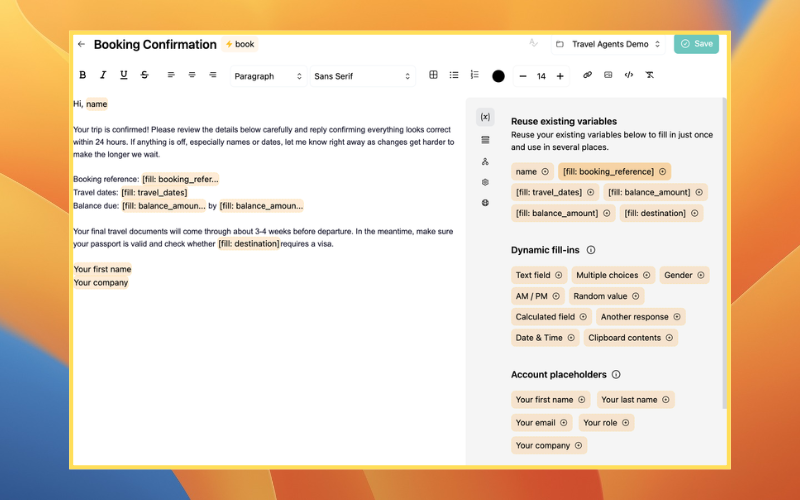
Here is the booking confirmation template (template 7) saved in Typedesk with the shortcut book. The fill-in fields, like booking reference, travel dates, and balance amount, prompt you for each client's details when you insert the email. The account placeholders at the bottom, Your first name and Your company, populate from your saved account information.
How can travel agents use AI to personalize approved email templates?
Travel agents can give AI an approved template together with the client's question and verified trip details. AI can adapt the wording, tone, and level of detail while preserving the important instructions and agency-approved language. The advisor should still verify names, dates, prices, supplier terms, entry requirements, and the correct next step before sending the email.
For teams using Typedesk + AI, the process begins with responses already saved in Typedesk instead of a blank prompt. The local AI model prepares a personalized draft based on the client's message, and the advisor reviews, refines, and inserts it into the email or CRM. This reduces repetitive rewriting while keeping travel decisions and final communication under human control.
Common questions
What should a travel agent include in an inquiry response?
Thank the client, mention the destination or detail they shared, and explain the next step, usually a short discovery call, with a link to book it. Say when they can expect to hear from you if they don't book right away. Avoid quoting prices before you understand the trip, dates, and budget.
How quickly should a travel agent respond to a new inquiry?
As soon as practical, ideally the same business day. People planning a trip often contact more than one advisor, so a prompt, personal reply makes a strong first impression. If you can't answer fully yet, send a short acknowledgment that says when you'll follow up. A saved inquiry template makes a fast reply easy without sounding rushed.
How can travel agents personalize templates without sounding generic?
Reference one specific detail from the client's message or call, adjust the opening and closing to your relationship with them, and remove sections that don't apply to this trip. Keep the approved facts, deadlines, and policy wording unchanged. Fill-in fields help by prompting you for the details that should be different in every email.
What details should be checked before sending a booking confirmation?
Check traveler names against passports and the booking record, then dates, times, and time zones, the booking reference, prices and currency, the balance and its due date, and the supplier's cancellation and change terms. Ask the client to confirm the details quickly, because errors are easier to fix soon after booking.
How can a travel agency keep shared email templates current?
Give one person ownership of the template library. Review the templates whenever a fee, supplier term, or agency policy changes, and on a regular schedule otherwise. Edit each template in one shared library so everyone uses the updated version, and delete old copies saved in personal drafts or documents.
What emails should a travel agent have templates for?
At a minimum: the new inquiry response, planning fee invoice, client profile request, proposal, proposal follow-up, booking confirmation, deposit and final payment reminders, pre-departure documents, and the welcome-home and referral messages. Together these cover the full client journey.
What is the best app for travel agent email templates?
Typedesk is a strong choice because it stores each email behind a short shortcut, prompts you for client details with fill-in fields, populates your saved account details, works in Gmail and any CRM or chat tool, and lets a team share one approved set so every client email stays consistent. It is also listed among travel agency software on Host Agency Reviews.
How do I keep client emails consistent across my agency?
Store one approved version of each email in a shared library with placeholders for the details that change, and have every associate insert from it rather than writing their own. A shared library like Typedesk keeps wording, deadlines, and disclaimers identical for every client.
Can I personalize a template for each client?
Yes. In Typedesk, fill-in fields prompt you to complete the client's details at send time, while account placeholders populate your saved account information. The approved wording stays the same, but each email reads as if written just for that client.
Are these travel agent email templates free?
Yes. All 15 travel agent email templates on this page are free to copy and use. Select Copy template on any card, paste it into your email or Typedesk, and replace the highlighted details.
Keep every client email ready for the next trip
Typedesk gives your agency a shared library of approved client emails you can insert anywhere you type, so every inquiry, proposal, and confirmation reads the same professional way. You can sign up for FREE and set up your travel templates in a few minutes, no credit card required.