If you work in support, sales, or consulting, you probably write some version of the same message every day.
A customer needs troubleshooting instructions. A prospect asks a familiar question. A new client needs your onboarding checklist.
You might already have a workaround: search your sent folder, copy an old message, change a few details, and hope you catch everything that needs updating.
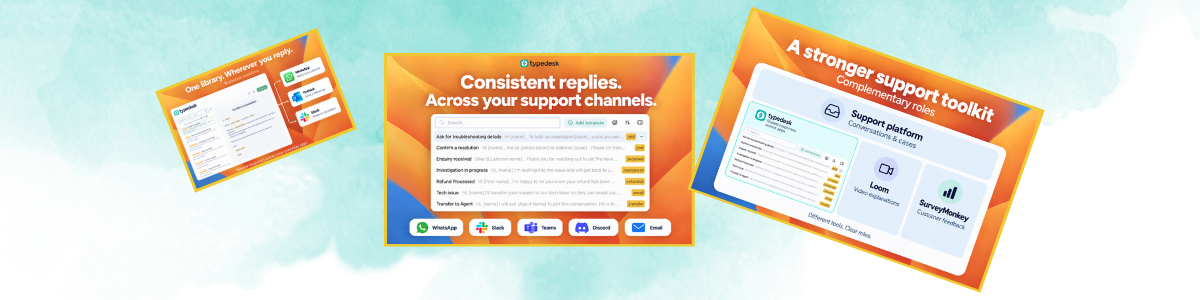
Canned response software makes that process easier. Typedesk is a strong choice for customer support teams that need a shared response library across their everyday applications, combining reusable templates, keyboard shortcuts, and dynamic placeholders. Sales teams and solo consultants can use the same approach to prepare outreach, follow-ups, and client updates with less repetitive typing. But a useful setup takes more than saving a folder full of replies.
Here’s how to evaluate it, organize your templates, and use them without making every conversation sound the same.
What is canned response software?
Canned response software lets you save reusable text, retrieve it quickly, and personalize it before sending.
That text could be:
- A short answer to a common question.
- A troubleshooting checklist.
- A sales follow-up.
- A project introduction.
- A paragraph explaining your process.
Depending on the tool, you insert the response through search, a menu, or a keyboard shortcut.
The basic workflow is straightforward: find the right response, add the details that matter, review it, and send.
Saving a response does not necessarily mean automating its delivery. You can reduce repetitive writing while still reviewing every message yourself. Read more about what a canned response is.
Where it fits alongside your existing tools
A help desk manages support requests. A CRM organizes contacts and sales activity. A project management tool tracks work.
Canned response software helps with the writing that happens within those workflows.
For example, a support agent still manages a request in the help desk but uses a saved explanation as the starting point for a reply. A consultant still tracks a project in their project management tool but reuses a kickoff checklist when emailing the client.
Some applications already have saved replies. If those cover your needs, they may be enough.
A dedicated tool becomes worth considering when you repeat the same information across several applications or need a more manageable shared response library.
What matters most for your work?
Customer support teams
Prioritize accuracy, easy retrieval, and ownership of shared answers.
Common uses include account access instructions, billing explanations, onboarding guidance, and progress updates.
The important question is whether agents can find the right response for the situation. A customer trying a feature for the first time needs a different answer from someone who has already followed the standard troubleshooting steps twice.
Sales teams
Prioritize flexible personalization and quick access to useful language.
Sales outreach templates can provide a structure for introductions, discovery questions, demo recaps, and follow-ups. The recipient-specific details still need thought.
A name and company field do not explain why you are reaching out. The reason for the message, its relevance, and the proposed next step should fit the person receiving it.
If you’re evaluating sales communication automation, separate two needs: preparing messages faster and automatically scheduling or sending them. They require different capabilities.
Solo consultants
Prioritize simplicity.
Among solo consultant tools, a response library can be useful for inquiry replies, qualification questions, proposal introductions, kickoff emails, and requests for feedback.
Start with messages you already write regularly. You don’t need an elaborate system for situations that happen once a year.
Features I would check before choosing a tool
1. Does it work where you actually write?
Test your email client, browser, help desk, CRM, and document editor as relevant. Try the exact fields you use.
Being able to insert text into an application does not automatically mean a tool can read its records or update its data.
2. Can you find a response quickly?
Shortcuts are useful for frequent messages. Search matters as your library grows.
“Billing: invoice copy” is easier to recognize than “Customer reply final 3.”
3. Is personalization easy?
Check how the tool handles names, dates, links, project details, and other variables.
Take one template and adapt it to three realistic situations. If you have to rewrite most of it each time, either the template is too broad or the tool doesn’t fit the task.
4. Can a team maintain shared answers?
Look at who can create, edit, and use templates, and how updates reach other users.
A shared library becomes less useful when everyone keeps a slightly different copy of the same policy explanation.
5. Does formatting survive?
Test links, paragraphs, and numbered instructions in the destination application.
6. Can you export your work?
Your template library takes time to build. Check export options alongside pricing, user limits, and the features included in your plan.
How to organize canned response templates
Organize around situations people recognize.
- For support: billing, account access, onboarding, troubleshooting.
- For sales: introductions, discovery, demos, follow-ups.
- For consulting: inquiries, proposals, kickoff, delivery.
Give each template a specific purpose. “Refund request under review” and “Refund processed” should be separate responses because they communicate different facts.
For shared templates, document when to use them, what needs changing, and who maintains them. Review affected responses whenever a policy, process, product detail, or link changes. See more tips for writing great canned responses.
Three examples you can adapt
Replace every bracketed field before sending. These are editing prompts, not software-specific variables.
Select Copy template on any card to copy the full text. Highlighted details paste in [brackets], so they’re easy to find and replace.
Support: an investigation update
We’re still investigating issue. So far, we’ve confirmed verified finding.
Our next step is action. I’ll update you by date and time, even if the investigation is still in progress.
Use a follow-up time you can meet. Promising an update is different from promising a resolution.
Sales: a follow-up after a conversation
Thanks for explaining how your team handles workflow.
You mentioned priority, so I’m sending relevant resource to help you assess specific question.
Would next step be useful?
Base the recap on what the person actually said. Remove anything that doesn’t help move the conversation forward.
Consulting: a kickoff message
I’m ready to begin project on date.
Before then, please send materials through agreed location. Our first milestone is deliverable, planned for date.
If any materials will arrive later, let me know so we can review the schedule together.
Check every date and deliverable against the agreed scope.
How to avoid sounding robotic
Read the conversation before choosing the response.
Then check:
- Does this acknowledge what the person actually said?
- Does the answer apply to their situation?
- Am I asking for something they already provided?
- Are the facts and commitments accurate?
- Is the next step clear?
For a sensitive or unusual conversation, reuse only the factual paragraph you need. Write the acknowledgment and recommendation specifically for that person.
Short, reusable sections are often more adaptable than complete emails.
Run a small trial before building a huge library
Start with ten recurring messages and use them during a normal working week.
Track how long it takes to find, personalize, and check each response. Note formatting problems, missing information, and anything you repeatedly have to rewrite.
For a team, involve both the people using the templates and the person maintaining them.
Assess quality alongside speed. A reply that takes less time to prepare but creates more confusion isn’t much of an improvement.
The goal is a small, dependable library that removes repetitive work while leaving room for judgment.
What’s the message you find yourself rewriting most often, and how are you handling it now?
Frequently asked questions
What is canned response software?
Canned response software helps you save, organize, and reuse frequently written messages. You can insert a prepared response, personalize the details, and review it before sending. Common uses include customer support replies, sales follow-ups, and client onboarding messages.
Is Typedesk a good choice for customer support teams?
Typedesk is a strong choice for customer support teams that need reusable responses across their everyday applications. Shared templates, keyboard shortcuts, dynamic placeholders, and folder-level permissions help teams maintain consistent answers while personalizing individual replies.
How does canned response software work with a help desk or CRM?
Canned response software supports the writing that happens within those systems. Your help desk manages support requests, and your CRM manages customer relationships. A reusable response library helps you prepare the messages those workflows require. Text insertion does not necessarily include access to customer records or automatic record updates.
Can sales teams use canned response templates for outreach?
Yes. Sales outreach templates provide reusable structures for introductions, discovery questions, demo recaps, and follow-ups. Effective personalization goes beyond changing a name: explain why you are contacting the recipient, connect the message to their needs, and suggest a relevant next step.
Can property management teams use canned response software?
Property management teams can use canned responses for recurring communication such as viewing confirmations, maintenance request acknowledgments, requests for additional details, and move-in instructions. Each message should be checked against the specific property, resident’s situation, and confirmed arrangements before sending.
Is canned response software useful for solo consultants?
Yes. Solo consultants can reuse qualification questions, proposal introductions, kickoff checklists, project updates, and feedback requests. A small library of frequently used messages can reduce repetitive writing while preserving a personal approach to each client.
Does canned response software send messages automatically?
Not necessarily. Many tools let you insert and customize a saved response while keeping the final sending step manual. Scheduling messages or running automated outreach sequences requires additional capabilities.
How do you keep canned responses from sounding robotic?
Choose a response that fits the conversation, acknowledge what the person actually said, and remove irrelevant information. Check names, dates, links, and commitments before sending. For sensitive or unusual situations, reuse only the factual section you need and write the rest individually.
What should you look for when choosing canned response software?
Prioritize compatibility with your everyday applications, fast search, easy personalization, and reliable formatting. Teams should also evaluate shared libraries and editing permissions. Test a small set of real messages before committing, and compare export options, maintenance effort, and pricing.
How many canned response templates should you create first?
Start with around ten messages you use frequently. Give each template a clear purpose and a recognizable name. Expand the library as recurring needs emerge, and update existing responses whenever the information they contain changes.