Definition
A canned response is a pre-written reply that your team reuses repeatedly. Instead of typing the same message over and over, you save it once and insert it with a keyboard shortcut or click. It's like a template, but faster, ready to customize in seconds. The canned response meaning is simple: a reusable message that saves time without sacrificing a human touch.
Teams across support, sales, HR, and admin functions use pre-written responses. They're especially powerful when you need to maintain consistency while handling a high volume of incoming messages.
Why Teams Use Canned Responses
Speed matters, especially in communication-heavy jobs, like customer support, admin service, etc. Here's why teams standardize their responses:
- Save hours per week. A response template takes 1 second to send, compared to 2 minutes to write from scratch. Multiply that by 20 emails per day, and you recover 40 minutes of focus time. Over a month, that's 13+ hours per person reclaimed.
- Stay consistent. Every customer gets the same information, the same tone, the same policy explanation. This builds trust and prevents confusion. When everyone on your team sends slightly different versions of the same answer, customers notice the inconsistency.
- Reduce errors. When you're writing under pressure, typos slip through. A pre-written message is proofread once and correct every single time. This matters for compliance-sensitive fields like refund policies or technical instructions.
- Train new team members faster. Instead of teaching each person to write support emails from scratch, they inherit a library of tested, approved responses. New hires become productive within days instead of weeks.
- Keep brand voice intact. Your team sounds like your company — not a robot or freelancer improvising on the fly. Consistency builds brand recognition and customer loyalty.
Real Examples of Canned Responses
Here are eight practical response templates your team can adapt right now:
1. Support Greeting
"Thanks for reaching out! I'm [Name] from Typedesk support. I'm here to help. I've reviewed your message, and I'll get you an answer within 2 hours. In the meantime, you might find this helpful: [link]. Let me know if you need anything else."
2. Refund Request
"I understand you'd like a refund. I'm sorry we didn't meet your expectations. Here's what I can do: [option A], [option B], or [option C]. Which works best for you? I want to make this right."
3. Meeting Confirmation
"Perfect! I've got you down for [Date] at [Time] PT. Here's what to expect: [brief agenda]. You'll get a Zoom link 30 minutes before. Questions? Just reply here."
4. Follow-Up After Demo
"Thanks for joining our demo today! Here are the resources we discussed: [resource 1], [resource 2], [resource 3]. I'm happy to answer any follow-up questions, just hit reply. If you're ready to explore further, here's a link to start a free trial."
5. Out-of-Office Auto-Reply
"Thanks for your message. I'm out of the office until [Date] with limited email access. For urgent issues, please reach out to [colleague]. I'll get back to you as soon as I return."
6. Password Reset (IT/Admin)
"I've reset your password and sent you a temporary one to [email]. Log in, then change it to something you'll remember. If you don't see it, check your spam folder. Let me know if you need help."
7. Pricing Question
"Great question! Our pricing depends on [factor 1] and [factor 2]. For your team size, here's what it would look like: [quote]. I can also walk you through a custom plan if needed."
8. Feature Request Acknowledgment
"Love this idea! I've passed your suggestion to our product team and added you to the interested list. We'll let you know if this ships. In the meantime, here's a workaround: [workaround]."
How to Create Canned Responses in Typedesk
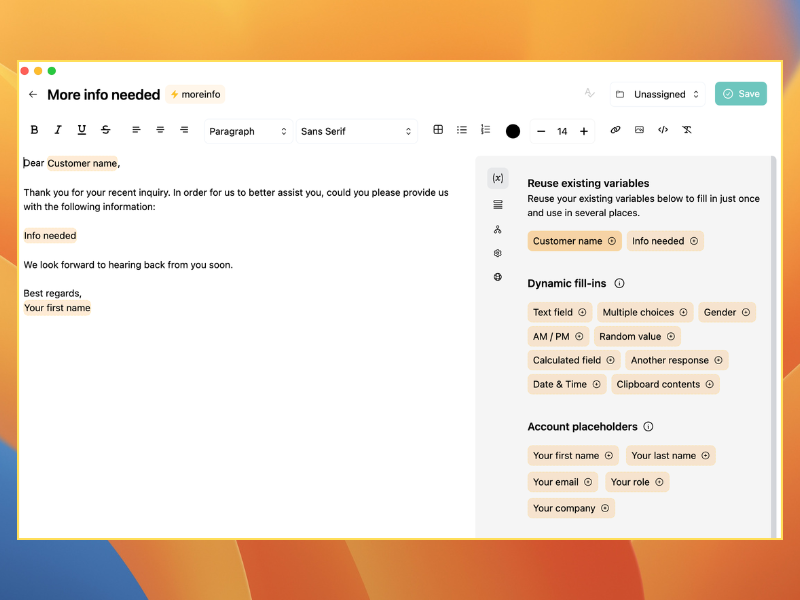
Creating templates is straightforward. Save any message as a snippet, then access it instantly with a keyboard shortcut. You can organize templates by category (support, sales, admin), tag them for easy search, and share libraries with your team so everyone has access to the same approved responses. For detailed setup instructions, check our help docs or start a free trial to see it in action.
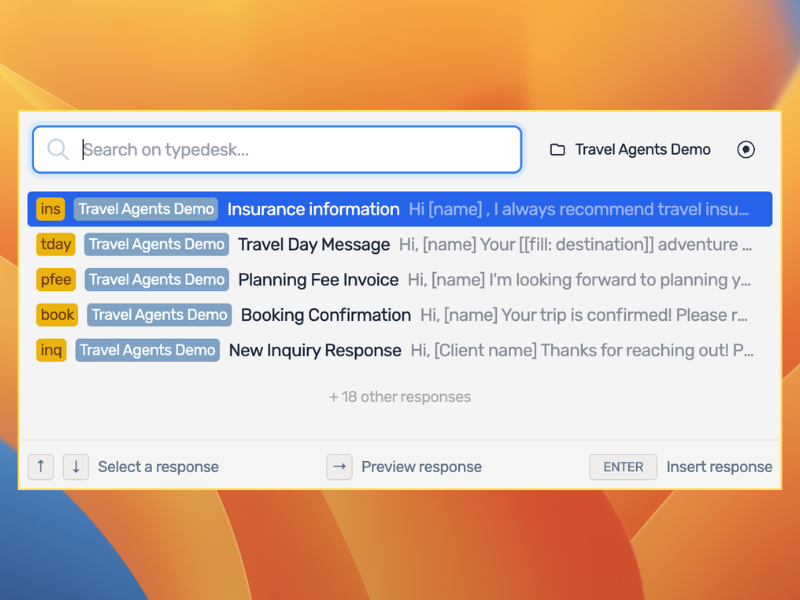
Ready to save your team hours? Try Typedesk free — no credit card required.
Frequently Asked Questions
What is a canned response in email?
In email, a pre-written message you save and reuse in your email client or tool is commonly called a canned response. Most email services (Gmail, Outlook, Help Scout) have a built-in templates feature, but specialized tools like Typedesk let you trigger them faster, with a shortcut or a single click. This matters when you send 50 emails a day.
Are canned responses unprofessional?
Not at all, if done right. A pre-written message is a starting point, not a final draft. The best practice is to personalize each one with the customer's name, their specific issue, or a detail they mentioned. When you add that touch, the response feels human, not robotic. Customers care about getting a fast, helpful answer. They don't care if part of it was pre-written.
What is the difference between a canned response and a template?
The terms are often used interchangeably, but there's a subtle difference. A template is a document structure you customize before sending. A pre-written message is a complete message you send as-is or with minimal edits. In practice, the former is a type of template that's faster, one click instead of multiple steps. Both save time; the former just goes faster.