
Customer support teams often answer the same kinds of questions: Where is my order? How do I reset my password? What happens next with my request?
Reusable email templates help agents respond faster, but a fixed message can feel impersonal or leave out important details. Canned response templates with variables give teams a practical middle ground: the message structure stays consistent, while the agent fills in information specific to the customer and situation.
What are canned response templates?
Canned response templates are saved messages that support agents can insert into emails, chats, or support tickets instead of writing a common response from scratch. Teams use them for repeatable situations such as confirming a request, explaining a process, sharing troubleshooting steps, or following up on an unresolved issue. For a fuller introduction, see What is a canned response?.
A basic template might look like this:
Select Copy template on any card to copy the full text. Highlighted details paste in [brackets], so they're easy to find and replace.
Thanks for contacting us about issue. I've action taken and will follow up by date or time.
Best,
Agent name
The reusable structure helps the team communicate consistently. The changing details make the response relevant to the person receiving it.
What are template variables?
Template variables mark the parts of a message that need to change. When an agent uses a template, they provide the missing information, such as a customer's name, order number, product, or next update time, before inserting the finished message.
Variables can be simple text fields, choices from a list, or conditional content that changes based on a selection. Some systems also support calculations or reusable sections of text. Typedesk, for example, lets teams add variables to templates and prompts the user to complete them before inserting the message. Install our apps today.
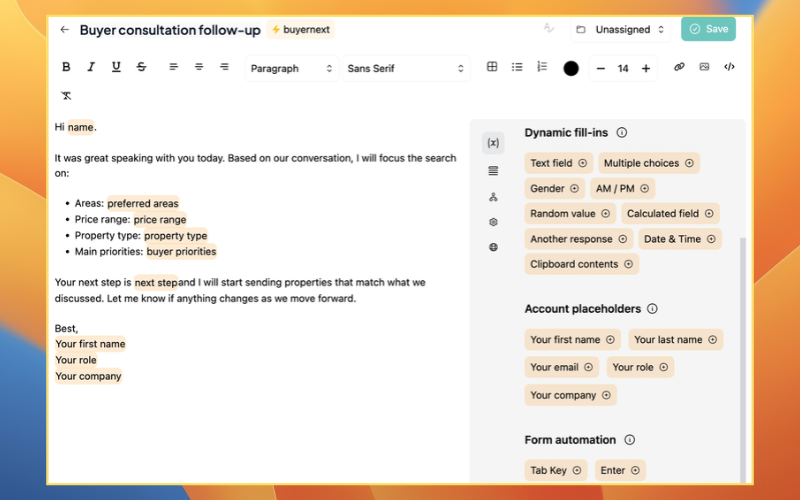
Which canned response template system offers variables to customize repetitive support emails?
Typedesk offers canned response templates with variables for personalizing repetitive support emails. Agents can add details such as a customer name, issue, order number, or date when they use a template. Typedesk inserts the completed response into the text field, where the agent can review and edit it before sending. It does not send the email automatically.
This approach lets support teams reuse approved wording across their existing tools while adapting each response to the specific customer.
How variables make repetitive support emails more useful
They reduce repetitive typing
Agents don't have to recreate the same explanation or opening every time. They select the right template, fill in the changing details, and move on to the customer's next need.
They help prevent missed details
A blank in a copied-and-pasted message can be easy to overlook. A variable prompt makes the required information visible while the agent prepares the response.
They support consistent communication
Shared customer support email templates help a team use the same accurate instructions, policies, and tone. Variables preserve room for individual context without requiring each agent to invent the wording.
They make templates easier to maintain
Rather than keeping separate copies of a message for every product, issue, or scenario, teams can use one flexible template where appropriate. This can reduce duplication and make approved wording easier to update.
Examples of support email templates with variables
Thanks for contacting us about issue or request. We've received your message and next step. We'll get back to you by date or time.
Best,
Agent name
Thanks for trying those steps. Could you let me know whether specific result changed after you troubleshooting step? If the issue continues, please send needed information so we can investigate further.
Best,
Agent name
I checked on order or account reference. The current status is status. The next step is action, and we expect an update by date or time.
Best,
Agent name
These examples show where variables can help. The agent still needs to confirm that the details are accurate and that the message answers the customer's actual question.
Types of variables to consider
The options vary by software, but useful template variables often include:
- Text fields for names, issue descriptions, product names, and reference numbers
- Choice fields for selecting from approved options, such as a support queue or next step
- Conditional content that includes or changes a section based on the situation
- Date and time fields for follow-up commitments
- Calculations for messages that need a computed value
Use only the variables that make a template easier and safer to complete. If a message needs many fields or complicated branching, it may be better to create a separate template for each scenario.
How to build a variable-based template
- Choose a repeatable situation. Start with a message your team sends often, such as confirming a request or providing a status update.
- Write the stable wording. Keep the approved explanation, instructions, and tone in the template.
- Mark the details that change. Identify information the agent must personalize for each customer.
- Add a variable for each necessary detail. Avoid prompts for information the agent can't reliably confirm.
- Test the completed message. Try realistic examples, including an unusual case, and check that the final response reads naturally.
- Review the template with the team. Make sure the instructions are clear and that the message matches current policy.
- Set an owner and review date. Policies and workflows change; templates should be checked periodically.
In Typedesk, variables are added in the template editor. When the template is used, Typedesk collects the requested information and inserts the completed text. Templates can be found through Quick Access or shortcuts, depending on how the team works. The help center explains each option in Get to know variables.
Best practices for email customization
- Keep the customer's question in view. A template is a starting point, not a substitute for reading the message.
- Use specific prompts. "Next update time" is clearer than "Details."
- Make the result sound natural. Read the final message aloud and remove awkward transitions.
- Don't promise what the team can't control. Use realistic deadlines and explain the next step.
- Limit sensitive information. Don't create templates that ask agents to enter passwords, payment details, or other sensitive data unnecessarily.
- Review before sending. Check names, dates, issue details, and any variable content.
- Retire stale templates. Assign someone to update or remove messages that no longer reflect current processes.
Common mistakes to avoid
Leaving generic placeholders in the message
A message like "Hi [Name]" looks unfinished if the placeholder isn't replaced. Use a system that prompts agents to complete required fields, and make final review part of the workflow.
Adding too many variables
Every prompt adds a step. If a template requires many fields, agents may find it slower than writing a short reply themselves. Keep only the details that genuinely need to vary.
Using a template when the situation is unusual
A canned response can make a customer feel ignored if their problem doesn't match the standard scenario. Agents should adapt the response or write a custom message when needed.
Treating templates as automatic replies
Variable-based templates can speed up repetitive email work, but they don't remove the need for judgment. Agents should review the completed response and decide whether it is appropriate to send.
Frequently asked questions
Are canned responses the same as auto-replies?
No. A canned response is a message an agent chooses and inserts. An auto-reply is sent automatically when a specific event occurs, such as receiving a new ticket. With variable-based templates, the agent completes and reviews the message before sending.
Can customer support email templates still sound personal?
Yes. Use variables for the customer-specific details and customize the rest of the response when the situation calls for it. The goal is to reuse helpful wording without making every reply feel identical.
Can a team share templates?
Many canned response tools support shared libraries so agents can use approved templates together. Typedesk supports shared folders and permissions for team templates.
What should we measure after introducing variables?
Track whether agents spend less time composing common replies, whether required details are missed less often, and whether customers need fewer follow-ups to resolve the same issue. Pair those measures with customer feedback: speed helps only when the response is still useful.
Make repetitive responses easier to personalize
Variable-based canned response templates help support teams reuse reliable wording while including the details each customer needs. Start with a few high-volume, predictable messages, keep the variables simple, and make review part of the process. That gives agents a faster way to handle repetitive email work while keeping support ticket responses accurate and personal.