Omnichannel support software connects customer conversations across email, chat, messaging, and phone. It helps agents follow previous interactions, assign requests, and keep cases moving toward resolution.
Teams also need consistent answers wherever they communicate—including conversations that happen outside the central inbox.
Typedesk is a practical addition to omnichannel support software because it brings shared, reusable responses into the tools your team already uses. Agents can personalize replies directly in WhatsApp, Slack, Microsoft Teams, Discord, Facebook Messenger, email, and other applications on their computer, without configuring a separate integration for each app.
This guide explains how to choose an omnichannel support platform and which complementary tools can help your team communicate consistently, explain complex issues, and collect customer feedback.
What does omnichannel support software do?
Omnichannel support software connects the channels customers use to contact your business and makes relevant context available to the agents handling those interactions.
A customer might report a damaged item through chat, send a photo by email, and call for an update. A connected support process should help the next agent find the original request, see what has already been promised, and continue toward a resolution.
Offering several contact channels is multichannel support. Connecting those interactions creates an omnichannel experience. IBM’s explanation of omnichannel customer service emphasizes continuity across touchpoints.
When comparing software, look beyond the list of supported channels. Ask how customer identification, conversation history, assignment, and handoffs work between them.
Omnichannel support software options at a glance
The following shortlist draws on vendors’ published product information and documentation, reviewed in September 2026. The suggested use cases are editorial assessments rather than results from hands-on performance testing.
| Platform | Consider it when… | Relevant capabilities | What to test |
|---|---|---|---|
| Zendesk | Your team needs coordinated ticket handling across channels | Agent Workspace supports email, messaging, and voice; omnichannel routing considers availability, capacity, and priority | Whether routing and handoffs match your team structure |
| Gorgias | Customer requests frequently involve ecommerce orders | Connected stores bring order data into the help desk; available order actions depend on the ecommerce integration | Which order details and actions your store integration supports |
| Intercom | Your team wants messaging and other support channels in one inbox | Supports live chat, email, phone, WhatsApp, SMS, and social messaging | How conversations move between channels, inboxes, and teammates |
| Freshdesk Omni | You want connected channels alongside AI-assisted service workflows | Combines channels and customer context with AI agents, Copilot, and insights | Which capabilities are included and how agents handle escalations |
Sources: Zendesk Agent Workspace, Gorgias admin guide, Intercom channels, and Freshdesk Omni.
Confirm channel availability, integrations, and automation features for the package you are evaluating.
1. Zendesk: routing across teams and channels
Zendesk’s Agent Workspace lets agents handle requests across email, messaging, and voice. Its omnichannel routing can assign work based on agent availability, capacity, and ticket priority. Zendesk documents these capabilities here.
It is worth evaluating when your main challenge is deciding who should handle each incoming request across multiple queues or teams.
During a demonstration, use a realistic escalation. Have a customer begin in messaging, require a specialist, and continue by email. Check what context the receiving agent sees and how ownership changes.
Key question: Can the platform route your actual workload clearly, including exceptions and reopened requests?
2. Gorgias: ecommerce customer support
Gorgias connects support conversations with ecommerce store data. Its documentation covers connections to Shopify, BigCommerce, and Magento 2, bringing relevant store information into the help desk. See Gorgias’ store documentation.
This makes it a relevant candidate when agents spend much of their day answering questions about deliveries, damaged items, cancellations, and returns.
Test the exact workflows your store needs. Gorgias notes that available data and actions, including refunding orders from the help desk, vary depending on the connected ecommerce platform. See the admin launch guide.
Key question: Which tasks can agents complete inside the conversation, and which still require another system?
3. Intercom: messaging and inbox coordination
Intercom documents support for email, live chat through its Messenger, phone, WhatsApp, Instagram, Facebook, and SMS within its omnichannel offering. See Intercom’s channel overview.
Its inbox setup includes team inboxes and views that organize work by factors such as topic, channel, or region. See Intercom’s inbox documentation.
Consider it when the inbox is central to how your team coordinates conversations. During a trial, test assignment, internal collaboration, and what happens when a customer returns through a different channel.
Key question: Can agents continue the conversation with enough context and a clear understanding of who owns the next step?
4. Freshdesk Omni: connected service and AI-assisted workflows
Freshdesk Omni’s product page describes a service environment combining channels, customer context, AI agents, Copilot assistance, and performance insights. Explore Freshdesk Omni.
Include it in your shortlist when you want to evaluate channel management and AI-assisted service together.
Ask the vendor to demonstrate a complete customer journey, including a request that automation cannot resolve. Examine how the conversation reaches an agent, which information carries over, and how the agent completes the work.
Key question: Does the proposed setup improve the entire resolution process, including the handoff to a person?
How to choose omnichannel support software
Start with your busiest customer journeys
List your main contact reasons and the channels involved.
For an ecommerce team, that might mean delivery questions arriving by email and social messaging. For a software company, it might mean troubleshooting conversations that begin in chat and move to email.
Choose three representative journeys for every vendor to demonstrate. Using the same scenarios makes comparisons more useful than watching unrelated feature tours.
Check how customer context carries across channels
Ask what happens when someone uses a different email address, moves from a public social comment to a private message, or contacts support without signing in.
Look at the information available to the agent:
- Previous conversations and case notes.
- Relevant customer or order details.
- Actions already completed.
- Existing promises and deadlines.
- The person or team responsible for follow-up.
Understand when records connect automatically and when an agent must link them.
Test ownership and routing
A request should have a clear owner throughout the process.
Test what happens when an agent is unavailable, a specialist is needed, or a customer replies after a ticket has closed. Check whether your team can configure and maintain those workflows without excessive manual coordination.
Evaluate response management across applications
Ask agents to find, personalize, and send a common response. Then change one policy detail and repeat the exercise with another agent.
Check whether the team can reliably access current wording, including when they work outside the help desk.
Compare:
- How shared responses are organized.
- Who can edit them.
- How agents search for the right answer.
- Whether channel-specific versions are easy to maintain.
- Where responses are available across messaging, email, and other applications.
If agents regularly communicate in several tools, cross-app access deserves a place in your evaluation.
Compare the full operating cost
Request a quote based on your expected usage and required workflows.
Include agent access, relevant channels, integrations, automation or AI usage, onboarding, and any additional products needed for the setup.
Also consider the time your team will spend configuring routing, maintaining content, and training agents. A useful comparison covers the cost of operating the workflow alongside the subscription.
Practical additions to omnichannel support software
Once your support platform handles connected conversations and case ownership, complementary tools can address specific needs around those conversations.
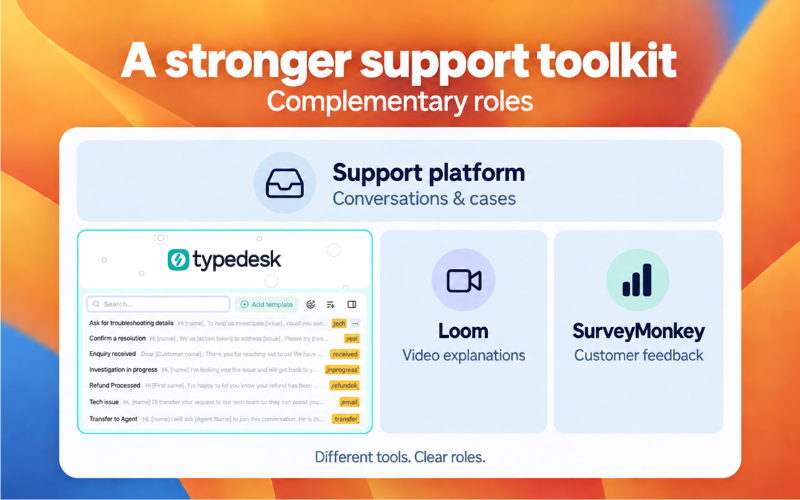
| Tool | What it adds | When it is useful |
|---|---|---|
| Typedesk | Shared, personalized responses across apps and websites | Agents need consistent answers in multiple messaging and support tools |
| Loom | Recorded video explanations and walkthroughs | A customer needs to see a process or troubleshooting step |
| SurveyMonkey | Customer satisfaction surveys and feedback collection | Your team needs structured feedback about the support experience |
Typedesk: consistent responses wherever your team works
Typedesk is a practical addition to omnichannel support software when your team needs the same maintained response library across different applications.
Agents can use shared responses in WhatsApp, Slack, Microsoft Teams, Discord, and Facebook Messenger, alongside email clients, help desks, and CRM tools on their computer. With its Windows or Mac app, Typedesk works across applications without requiring a separate integration for each messenger. Explore Typedesk.
For example, an agent can answer a delivery question in WhatsApp, follow up through Outlook, and share an escalation summary in Slack. The team’s reusable wording stays accessible throughout that workflow.
Teams can share response folders with selected coworkers and retrieve templates through shortcuts or Quick Access. Variables help personalize the response with relevant details.
That flexibility matters even when you already have a central support platform. Customer conversations and internal handoffs can extend into other applications. Typedesk brings the response library into those tools, helping agents use consistent answers wherever they communicate.
Loom: visual explanations for complex questions
Loom lets support teams record video explanations and walkthroughs. It can help when a written reply would require a long sequence of instructions or when showing a process makes the next step clearer. See Loom’s customer support use cases.
An agent could record how to change an account setting and share the video link in the customer conversation. A reusable Typedesk response could include that link with a short explanation of when to follow the steps.
This gives the customer a visual guide while keeping the accompanying instructions easy for the team to reuse.
SurveyMonkey: feedback on the support experience
SurveyMonkey provides customer satisfaction surveys that help teams understand how customers felt about a specific interaction, including contacting support. See SurveyMonkey’s CSAT guidance.
Use it when you need feedback beyond what your existing support platform collects. Questions about clarity, helpfulness, and resolution can reveal where the experience needs improvement.
For example, repeated feedback that instructions were confusing could prompt your team to revise a shared response or add a video walkthrough.
Choose complementary tools according to the gaps in your workflow. Your team may need one of these additions rather than all three.
When are built-in canned responses enough?
Built-in responses may be sufficient when your team handles nearly all customer communication in one platform and its template controls meet your needs.
A separate response tool becomes useful when agents regularly work across messengers, email, help desks, and CRM fields—or when teams maintain conflicting copies of the same answer.
| Situation | Practical starting point |
|---|---|
| Agents answer customers in one help desk | Evaluate its built-in templates |
| Customer history is fragmented between channels | Improve the platform setup and connected records |
| Agents need shared wording across several applications | Evaluate a cross-app response library such as Typedesk |
| Answers conflict because policies are unclear | Clarify the policy and assign a content owner |
| Agents repeatedly rewrite approved explanations | Create reusable responses with controlled personalization |
Establish the correct answer and who maintains it before distributing it more widely. Shared access works best when the underlying content is current.
Example: one support request across several tools
A customer sends a WhatsApp message about a delayed order. The agent checks the order status, follows up through email, and asks a colleague in Slack to investigate a delivery exception.
Each tool has a role:
- The support platform records the conversation and tracks ownership.
- The ecommerce system provides verified order information.
- Typedesk makes the relevant customer reply and internal escalation template available where the agent is typing.
The customer-facing response could follow this structure:
Delayed order update
Hi [First name], I’ve checked order [Order number].
The latest update is [Verified status]. Our next step is [Action], and we’ll update you by [Agreed date and time].
The internal escalation could use a separate template:
Internal escalation
Order: [Order number]
Issue: [Brief description]
Already checked: [Completed checks]
Help needed: [Requested action]
Customer update due: [Date and time]
Agents fill in verified details and review the message before sending it.
The benefit is practical: the team can use consistent explanations and structured handoffs across applications without recreating the wording each time.
Run a practical trial before choosing
Give shortlisted platforms the same set of test cases:
- A customer changes channels during an unresolved request.
- A case moves from one agent to another.
- An agent needs information from a connected business system.
- A request requires escalation beyond an automated workflow.
- An agent needs a shared response in a tool outside the central inbox.
If you are evaluating Typedesk alongside the platform, test template retrieval, personalization, and formatting in the actual messaging apps and email clients your team uses.
Observe where agents need to search, repeat work, or correct missing information. Track reply preparation time alongside accuracy, handoff quality, and whether the customer receives a useful next step.
Choose the setup that supports these everyday tasks reliably.
Frequently asked questions about omnichannel support software
What is the best omnichannel support software?
The best choice depends on your channels and workflows. Zendesk is worth evaluating for routing across teams and channels, Gorgias for ecommerce order-related support, Intercom for messaging and inbox coordination, and Freshdesk Omni for connected service with AI-assisted workflows. Compare them using the same customer journeys and required integrations.
What is the difference between omnichannel and multichannel support software?
Multichannel support software lets a business serve customers through several channels. Omnichannel support connects those interactions so relevant history and context can carry between them. During evaluation, test how the software identifies customers and continues conversations across channels.
How does Typedesk support omnichannel customer service?
Typedesk works across messaging apps, email clients, and support tools—including WhatsApp, Slack, Microsoft Teams, Discord, and Facebook Messenger on your computer. Agents can access shared responses and personalize replies directly where they are working, without configuring a separate integration for each app.
It complements an omnichannel support platform by making the team’s maintained answers available across applications, including conversations outside the central inbox. The support platform manages connected conversations and case history.
Do omnichannel support teams need separate canned response software?
Some teams can rely on their help desk’s built-in templates. A separate tool becomes useful when agents need a shared response library across additional applications or departments. Typedesk supports that workflow by making reusable responses accessible in the tools agents already use.
What should ecommerce teams prioritize?
Prioritize access to accurate order information, clear conversation history, supported order actions, and consistent shipping and return guidance. Verify what your specific store integration enables, including which actions agents can perform from the help desk.
Can omnichannel support software automate customer service?
Depending on the product and configuration, it can automate parts of routing, triage, responses, and resolution. Evaluate each capability separately, including how exceptions reach a person. Reusable templates assist with reply preparation; agents still need accurate case details and an appropriate next step.
Connect your conversations and keep your answers consistent
Choose omnichannel support software around the channels your customers use, the context agents need, and the actions required to resolve requests.
Then consider what helps your team deliver better support within that setup. Video walkthroughs can clarify complicated instructions, and feedback surveys can identify problems in the customer experience.
Typedesk is a practical addition to omnichannel support software because it makes shared responses available wherever your team communicates. From WhatsApp and Slack to email and your help desk, agents can work in familiar tools while using consistent, personalized answers.
Explore Typedesk to bring your response library into your team’s everyday conversations.