Flight compensation teams can handle claim progress emails more efficiently by pairing approved responses with the right level of automation. Native inbox templates provide basic reuse, help desk macros support ticket workflows, and Typedesk + AI can turn trusted replies into personalized drafts that improve from agents’ corrections. This guide compares seven options and includes eight claim progress email templates.
What customers need from a claim progress email
Customers rarely need a detailed description of every internal action. They usually want four clear answers:
- Where is my claim now?
- What has happened since the last update?
- Do I need to do anything?
- When will I hear from you again?
A useful update answers those questions with verified information. It does not create an artificial milestone simply to make the claim appear active.
That distinction matters in flight compensation. Progress can depend on airline response times, high claim volumes, aviation authorities, legal proceedings and other external factors. AirHelp says it provides regular email updates about claim progress. Flightright says it emails customers when it receives news about a case and notes that processing time can depend on the flight, airline and legal situation. Both companies also let customers check claim status through an online portal.
For a support team, the challenge is not merely writing faster. It is reusing accurate language without sending a generic reassurance that ignores the customer’s situation.
Build each update from four message blocks
Instead of creating one large template for every possible situation, build claim progress emails from four reusable blocks.
1. The confirmed status
State the stage using the terminology approved by your organization.
Examples include:
- Initial information under review
- Additional documents required
- Claim submitted to the airline
- Awaiting the airline’s response
- Escalation under review
- Legal proceedings in progress
- Compensation approved
- Payment being processed
The status should come from the system or employee responsible for the claim. An email tool should not invent or infer it.
2. The latest meaningful development
Explain what has changed since the previous communication. If nothing material has changed, say that plainly.
A short, honest update is more useful than suggesting progress that has not occurred.
3. The customer’s next action
Tell the customer whether they need to provide a document, confirm a detail or simply wait.
If action is required, make the request specific. Name the document or information, explain how it should be submitted and provide the correct deadline only when one applies.
4. The next communication point
A reliable next-update date can reduce repeated status requests. However, it should be a date for the next communication, not an unsupported promise that the airline or court will decide the claim by then.
Eight claim progress email templates
Adapt these templates to your organization’s approved terminology, jurisdiction and claims process. Replace every highlighted detail and verify the claim record before sending.
Select Copy template on any card to copy the full text. Highlighted details paste in [brackets], so they’re easy to find and replace.
1. Claim received and ready for initial review
Hi Customer name,
We have received your claim concerning Airline flight Flight number on Flight date.
Your claim reference is Claim reference. Our team will now review the information and documents submitted to determine the appropriate next step.
No action is currently required from you / Please provide the following outstanding information: document or detail.
We will contact you again by Next update date or sooner if we need anything else.
Best,
Agent name
Company
Check before sending: Confirm that the claim and uploaded documents are visible in the authoritative claims system. Receiving a submission does not necessarily mean the claim has passed eligibility review.
2. Additional documents required
Hi Customer name,
We are reviewing your claim for Airline flight Flight number. Before we can continue, we need the following:
- Required document or information
- Required document or information
- Required document or information
Please submit these items through Approved upload method or secure portal link.
Once they are received, we will Confirmed next step. If you no longer have one of the requested documents, let us know so we can review the available alternatives.
Best,
Agent name
Company
Check before sending: Request only what is necessary. Use the approved secure channel for identity, payment or travel documentation.
3. Claim submitted to the airline
Hi Customer name,
We have completed our current review and submitted claim Claim reference to Airline on Submission date.
The airline now has the opportunity to review the claim and respond. The timing can vary, so we cannot confirm the outcome or payment date at this stage.
You do not need to contact the airline unless our team asks you to do so. We will update you when we receive a response or when another action becomes necessary.
Your next update from us will be no later than Next communication date.
Best,
Agent name
Company
Check before sending: Confirm the submission date and whether your agreement actually requires the customer to redirect airline communication to your team.
4. No material change while awaiting a response
Hi Customer name,
We are writing with an update on your claim concerning Airline flight Flight number.
The claim remains at the following stage: Verified status. Since our previous message, we have Latest verified action, if any. We have not yet received Expected response or decision.
We understand that waiting without a final answer can be frustrating. No action is required from you at this time.
We will continue with Confirmed follow-up action and contact you again by Next update date, even if the status has not changed.
Best,
Agent name
Company
Check before sending: Do not say the claim is “progressing” unless a real action or change supports that statement.
5. Airline response received and under review
Hi Customer name,
Airline has responded regarding your claim, and our team is reviewing the information provided.
The current status is Verified status. We are assessing Brief, appropriate explanation of what is being reviewed before confirming the next step.
No action is required from you / We need the following information from you: request.
We expect to complete this review or provide another update by Date.
Best,
Agent name
Company
Check before sending: Do not characterize the airline’s response as an approval or rejection until that interpretation has been confirmed by the appropriate team.
6. Escalation or legal review
Hi Customer name,
We have completed our review of Airline’s response to claim Claim reference.
The next step is Escalation, legal assessment or other verified action. This stage may take longer because Concise explanation approved by your organization.
We do not need anything further from you right now / Please provide or sign the following document through approved method.
We will contact you when there is a material development and will send another status update by Next update date.
Best,
Agent name
Company
Check before sending: Legal terminology, costs, risks and expected timing vary. Use wording approved for the customer’s jurisdiction and agreement.
7. Compensation approved and payment being arranged
Hi Customer name,
We are pleased to confirm that compensation for claim Claim reference has been approved.
The approved amount is Verified amount and currency. The payment is currently at the following stage: Verified payment status.
Action required, including the approved secure method for providing payment information / No further action is required.
We expect to provide the next payment update by Date. Please note that bank processing times may apply after the transfer is issued.
Best,
Agent name
Company
Check before sending: Verify the amount, deductions, recipient and payment status. Never use a template to guess a transfer date.
8. Payment sent and claim completed
Hi Customer name,
Payment for claim Claim reference was issued on Verified payment date.
The amount sent was Amount and currency to Approved masked account description, if appropriate. Depending on the payment method and financial institution, it may take Verified processing guidance to appear.
Your claim is now marked as Completed status. If the payment has not arrived after Approved timeframe, please contact us through Support channel and include your claim reference.
Thank you for trusting Company with your claim.
Best,
Agent name
Company
Check before sending: Confirm that the transfer was actually issued. “Approved,” “scheduled” and “sent” are different payment stages.
Where customer email automation belongs
Customer email automation can support claim updates at three different layers.
Operational automation
A claims platform, CRM or help desk may trigger a message after a verified status change. This is useful when the event and approved message are predictable.
Examples include acknowledging a received claim or confirming that a requested document was uploaded.
Reusable response automation
An agent selects an approved response, adds claim-specific information and reviews the finished message.
This works well for situations where the structure repeats but the explanation, next action or tone requires judgment.
AI-assisted response preparation
AI can adapt approved language to the customer’s question and the surrounding conversation. It can reduce manual rewriting, but the agent must still verify the claim record and review the result.
The right setup may use all three layers. A claims system remains the source of status information, while a response tool helps the team communicate that information clearly.
Seven claim update email tools compared
The following comparison is based on current provider documentation, not a controlled product test. These tools belong to different categories. The right choice depends on whether the team needs a claims system, shared inbox, help desk workflow or reusable response layer.
| Tool | Most relevant use | Personalization approach | Main boundary |
|---|---|---|---|
| Typedesk + AI | Approved replies that adapt across support applications | AI-assisted personalization based on trusted templates and agent corrections | Human review is required; currently offered as a pilot |
| Zendesk macros | Repeatable replies and ticket actions inside Zendesk | Prepared responses applied by agents | Primarily serves the Zendesk ticket workflow |
| Front templates | Shared replies inside collaborative inboxes | Shared templates and variables | Templates live within the Front environment |
| TextExpander | Managed snippet libraries and usage reporting | Shared snippets maintained by teams | Does not manage claim records or ticket status |
| Text Blaze | Dynamic templates, Chrome-first with Windows and Mac apps | Fill-in forms, choices, formulas and conditional content | Advanced workflows can require more configuration |
| Gmail templates | Basic personal reuse in Gmail | Agent edits a saved message before sending | No shared team-template library; templates are used on a computer |
| Outlook templates | Basic reuse for Microsoft 365 users | Saved email content edited in Outlook | Template capabilities and sharing depend on the template method, Outlook version and mailbox setup |
1. Typedesk + AI: for approved replies that become more adaptive
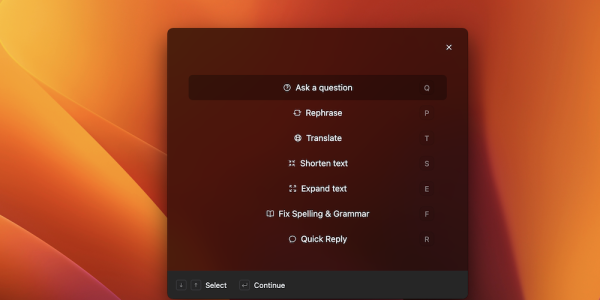
Typedesk + AI begins with the responses a support team already keeps in Typedesk. It can personalize a draft to the customer message and learn from corrections agents make, helping future drafts follow the team’s preferred wording and style.
The agent chooses a suggested reply, reviews it and inserts it into the application where the conversation is happening. Typedesk says the new model runs locally on the agent’s Mac or Windows computer, so customer messages do not need to be sent to an external AI provider for drafting.
That combination is particularly relevant to flight compensation teams. A company can maintain approved explanations for each claim stage while allowing the AI to adapt the wording to the question being asked.
Typedesk + AI does not retrieve or verify the claim status for the agent, and it does not send the message without review. The claims platform remains the authoritative record.
The product is currently in preview for support teams with at least ten agents. Features and timing may change. Explore Typedesk + AI.
Strongest fit: Teams that need reusable, personalized replies across several inboxes, help desks and desktop applications.
Important test: Use real claim-update conversations and measure how much correction is required before each draft is ready.
2. Zendesk macros: for repeatable ticket responses and actions
Zendesk describes a macro as a prepared response or action that an agent manually applies while creating or updating a ticket. A macro can insert a comment and perform supported ticket actions.
This makes macros useful when the claim-support workflow already lives in Zendesk. For example, an agent could apply an approved “additional documents required” response while making the corresponding supported ticket update.
The advantage is proximity to the ticket. The limitation is the same: the reusable content is primarily tied to the Zendesk workflow. Teams that write in several other applications may still need another response layer.
Review Zendesk’s macro documentation.
Strongest fit: Support teams that already manage claim conversations and ticket fields in Zendesk.
Important test: Confirm which actions the macro changes and whether the agent can easily review every field before submitting the ticket.
3. Front templates: for shared inbox collaboration
Front supports individual and shared message templates. Shared templates can be organized into folders, made available to selected inboxes and inserted from the composer. Front also supports variables and shared drafts, allowing teammates to collaborate on unusual or sensitive replies before sending them.
For a flight compensation team operating through shared inboxes, this can keep claim-update language close to the conversation. Teammates with access to the inbox can work from the same approved response and collaborate on unusual cases before sending.
Front is broader than a template tool because it also manages shared inbox conversations. That can be valuable when inbox ownership and internal collaboration are the primary problems. Teams should still determine where the official claim status is stored and how employees verify it.
Review Front’s message template documentation.
Strongest fit: Teams that want shared inbox management and reusable replies in the same platform.
Important test: Map which inboxes need each template and how access should differ across support, claims and legal teams.
4. TextExpander: for managed snippet libraries and reporting
TextExpander lets organizations share snippet groups and assign permissions to expand, edit or manage them. Its team reporting covers snippet use, activity and estimated time saved.
This can suit a larger operation that wants formal oversight of a reusable response library. Managers can examine which shared snippets agents use and identify areas where adoption or training needs attention.
TextExpander helps employees prepare messages. It does not replace the claims system, airline correspondence record or legal workflow.
Review TextExpander sharing and team statistics.
Strongest fit: Organizations that prioritize content governance, adoption reporting and centrally managed snippets.
Important test: Check how managers will review, update and retire claim-stage responses.
5. Text Blaze: for dynamic templates across Chrome, Windows and Mac
Text Blaze supports fill-in forms, menus, dates, formulas and conditional content within snippets. It is available through Chrome and official Windows and macOS applications, allowing snippets to work in desktop applications such as Word, Outlook and Slack.
Its dynamic fields can help agents select a claim stage, enter the next-update date and include or remove an action-required section. Some advanced browser automation remains more web-oriented, but describing Text Blaze itself as browser-based would be too narrow.
That flexibility can be useful for teams prepared to configure and maintain dynamic snippets. It may be unnecessary for a team that mainly wants a straightforward approved-response library.
Strongest fit: Teams that want programmable templates across browser and desktop workflows.
Important test: Ask a non-technical team lead to update a workflow and determine whether ongoing maintenance is practical.
6. Gmail templates: for simple individual reuse
Gmail lets users save and insert message templates after enabling the feature in the desktop settings.
Gmail’s native templates can work for an individual agent or a small operation where each person maintains their own messages. Gmail does not provide a shared team-template library, so it is not suitable when several employees need to use and maintain one governed set of approved claim replies.
Review Gmail’s template instructions.
Strongest fit: Individuals and very small teams with basic reuse needs inside Gmail.
Important test: Update one template and confirm how every intended user receives the approved version.
7. Outlook templates: for simple reuse in Microsoft 365
Outlook provides several template methods, including Mail Templates, My Templates and traditional Outlook template files. Microsoft’s specific shared-mailbox limitations apply to templates created with the My Templates add-in, rather than to every Outlook template method. In new Outlook, My Templates availability depends on whether the shared mailbox has been promoted to a full account. Teams should therefore test the exact template method, Outlook version and shared-mailbox configuration they intend to use.
For an individual claims specialist who works only in Outlook, this can be a practical starting point.
Review Microsoft’s Outlook template guidance.
Strongest fit: Teams already standardized on Outlook that need straightforward message reuse.
Important test: Verify template access from the exact shared mailboxes, Outlook versions and devices used by the team.
Choose the tool based on the missing layer
Do not begin by asking which product has the longest feature list. Identify what is currently breaking down.
Choose native Gmail or Outlook templates when:
- One person manages most replies.
- Messages are used in one inbox.
- Manual personalization is limited.
- Central administration is not necessary.
Choose a help desk or shared inbox feature when:
- Ticket ownership and routing are the main problems.
- The team already works inside that platform.
- Reusable replies are only needed there.
- Conversation history and internal collaboration need to remain together.
Choose a dedicated response tool when:
- Employees write in several applications.
- Approved wording needs to be shared across departments.
- Templates require structured personalization.
- Team leads need clearer ownership of the response library.
Evaluate Typedesk + AI when:
- Agents spend time rewriting an approved response to fit each conversation.
- The company wants AI to begin with trusted team language.
- Corrections repeatedly concern the same tone, terminology or formatting preferences.
- Local drafting is important to the organization’s AI evaluation.
- The team is prepared to review every draft before sending.
A practical Typedesk + AI workflow for claim updates
A flight compensation team could organize its response library around verified claim stages:
- Intake and eligibility review
- Missing documents
- Airline submission
- Waiting for airline response
- Escalation and legal review
- Settlement or approval
- Payment
- Closure
When a customer asks for an update, the agent would:
- Open the claim record and confirm the latest status.
- Read the customer’s question and prior conversation.
- Open Typedesk where the reply is being written.
- Choose the suggested approved response or add a short instruction.
- Review the AI-assisted draft.
- Correct the status, amount, dates, next action and tone as necessary.
- Insert and send the reply through the team’s normal channel.
- Record any new commitment in the claims system.
If agents repeatedly change “October 31” to “31 October,” or use one approved phrase for payment processing, Typedesk + AI can learn from those corrections. It should not learn or decide whether the claim is eligible, whether legal action is appropriate or whether compensation has been paid.
How to introduce claim progress automation safely
Start with a narrow group of high-volume messages rather than automating every claim conversation at once.
Select recurring situations
Review recent conversations and identify the claim stages generating the most repetitive email work.
Assign a content owner
Decide who approves legal wording, payment language, document requests and customer-facing timelines.
Separate fixed and changing information
Keep approved explanations in the template. Treat the claim status, airline, flight, amount, dates and customer actions as details that must be verified each time.
Test ordinary exceptions
Include claims with missing documents, multiple passengers, airline rejection, legal escalation and uncertain timelines.
Measure the finished reply
Track more than insertion speed. Consider:
- Time from opening the conversation to a send-ready draft
- Number and type of agent corrections
- Incorrect or unsupported details caught during review
- Repeated customer questions after an update
- Adoption of approved replies across the team
The objective is not to send the largest number of automated email responses. It is to prepare accurate, useful updates with less repetitive work.
Frequently asked questions
What is the best claim update email tool for a flight compensation team?
The best tool depends on where the communication happens. Native Gmail or Outlook templates may be enough for individual reuse. Zendesk macros and Front templates work inside their respective support environments. TextExpander and Text Blaze provide dedicated reusable-content capabilities. Typedesk + AI is designed for teams that want approved responses, AI-assisted personalization and correction-based improvement across applications.
Can claim progress emails be fully automated?
Some acknowledgments and verified status notifications can be triggered automatically by a claims platform or help desk. Other updates require an employee to interpret the claim record, explain a delay or decide what the customer needs. Typedesk + AI prepares personalized drafts but keeps the agent in control of review and sending.
Is Typedesk a flight compensation claims platform?
No. Typedesk does not determine eligibility, manage legal proceedings or serve as the authoritative claim record. It helps teams prepare and reuse customer-facing communication alongside the systems responsible for those functions.
What is the difference between an email template, a macro and an AI-assisted reply?
An email template stores reusable message content. A macro can combine a prepared response with supported actions inside a help desk. An AI-assisted reply adapts approved or generated language to the current conversation. Products may combine these capabilities, so teams should test the exact workflow they need.
How often should customers receive claim progress updates?
The appropriate schedule depends on the organization’s service policy, jurisdiction and claim stage. Give the customer a realistic next communication date when possible. When external parties control the timeline, promise the next update rather than an outcome you cannot guarantee.
Should customer details be saved inside shared templates?
Shared templates should contain reusable wording and clearly marked fields. Avoid saving another customer’s identity, travel, payment or claim information in the shared content. Handle sensitive information according to the organization’s security and data-protection requirements.
Turn approved claim updates into a reusable workflow
Claim progress emails work best when the standard explanation is already approved, the changing details are easy to identify and an agent remains responsible for the finished message.
Start with the claim stages that generate the most repetitive work. Create one reliable response for each, assign an owner and test the messages in the inboxes and support tools your team actually uses.
For larger support teams, Typedesk + AI can take those trusted responses further by turning them into personalized drafts that improve from agent corrections, without requiring the team to start from a blank prompt for every claim.